Seedance 2.0 is a modern video generation neural network developed by ByteDance. It is designed to create realistic, cinematic scenes with a high level of control over elements, characters, and audio.
The model supports up to 6 images, 3 videos, and 3 audio files as references. It stands out for its multi-scene storytelling capabilities, expressive animation, and strong visual consistency.
- 🎛 Navigation
- 💥 Step-by-Step Guide to Using Seedance 2.0 “Text-to-Video”
- 💥 Step-by-Step Guide to Using Seedance 2.0 “Working with References”
- 💥 Step-by-Step Guide to Using Seedance New “Working with Video References”
- 💥 Step-by-Step Guide to Using Seedance New “Working with Audio References”
🎛 Navigation
🏠 Main menu > 🎬 Video of the future > 🧿 Seedance 2.0


💥 Step-by-Step Guide to Using Seedance 2.0 “Text-to-Video”
When working with the Text-to-Video feature in Seedance 2.0, the first step is to compose your text prompt correctly.
Crafting a Text Prompt
High-quality generation directly depends on how accurately and consistently the scene is described. It is not enough to simply present an idea - you need to clearly define the character, environment, and actions to avoid distortions, inconsistencies, or unexpected changes during generation.
A good text prompt should include:
- Character / Object Description
At this stage, you should define the appearance of the character or object as precisely as possible. It is important to include key features such as the face, body type, hairstyle, clothing, materials, shape, color, and other visual details. If the same character or object appears throughout the video, this should be stated explicitly so the model can maintain consistency across all scenes. For example:
“Same person in all shots. Preserve exact appearance throughout. Stable face throughout.”
- Action
Clearly describe what the character or object is doing, the sequence of actions, and how they interact with the environment. Use specific phrasing. Instead of “walks beautifully,” write:
“Walks forward confidently, turns head toward the camera, adjusts collar.”
The more precise and logical the motion description is, the more stable, coherent, and predictable the final result will be.
- Location
Describe and define the setting in detail: whether it is an interior or exterior, the placement of objects, the atmosphere, the background, and any important environmental elements.
- Lighting
Lighting defines the mood, depth, and overall atmosphere of the scene, so it should be specified separately. You can describe the light source, its quality, and color, for example: soft daylight, harsh backlight, warm volumetric lighting, neon accents, cinematic rim light, etc.
- Camera Movement
Specify the shot type and camera movement, as they determine the overall dynamics and visual rhythm of the video. You can combine different approaches, such as smooth fly-throughs, sharp zoom-ins, tracking shots, close-ups, wide shots, or changing camera angles.
- Constraints and Stability
At the end of the prompt, it is recommended to define technical constraints in order to improve stability and visual quality. These usually include avoiding distortions, flickering, deformations, ghosting, or random changes in the face, clothing, objects, or scene.
For example:
“No deformation. No flickering. No ghosting. Stable face throughout. Realistic physics.”
Additional Recommendations
- Avoid vague wording such as “beautiful,” “interesting,” or “cool,” as these words do not give the model a clear understanding of the desired result.
- If needed, break the scenario into time segments, for example [0–3s], [3–6s], to gain more precise control over timing and the sequence of actions.
- When working with characters, define and maintain their appearance and behavior to avoid random changes throughout the video.
- It is recommended to write prompts in English, as the model interprets English phrasing more accurately and better understands details, styles, and camera movements. This is especially important for complex scenes and dynamic videos where high precision is required.
- The more detailed and precise the prompt is, the higher the quality, stability, and predictability of the final result will be.
Example Prompt:
«A blue elephant with smooth cartoon skin, large expressive eyes, big ears and a rounded body, standing on sand near the ocean. The elephant has a soft stylized look with clean shapes and subtle shading. Same elephant in all shots. Preserve exact appearance throughout. Stable character consistency.
The elephant calmly walks along the beach, leaving footprints in the sand. Suddenly, a powerful burst of sand explodes upward in front of it, scattering particles in all directions. From the explosion, a crocodile rapidly emerges, pushing through the sand with dynamic motion. At the same moment, penguins begin falling from the sky in different directions, landing around the scene and sliding across the sand. The moment turns into chaotic animal interaction: the elephant reacts with surprise, the crocodile moves energetically through the sand, penguins tumble and scatter, creating a playful, high-energy sequence.
The setting is a beach by the ocean with soft sand, gentle waves and a clear horizon. The environment remains the same, but becomes more dynamic during the action, starting calm, then transitioning into an energetic scene with multiple animals interacting across the frame.
Lighting starts as bright sunny daylight with warm tones, then intensifies during the explosion with stronger highlights and contrast, maintaining a vibrant, colorful cartoon atmosphere. Reflections on the water and highlights on the characters remain clean and stylized.
The camera begins with a smooth slow tracking shot following the elephant, then shifts into dynamic cinematic movement: crash zoom during the sand explosion, fast handheld-style motion for chaotic action, quick cuts between angles, low-angle shots to emphasize scale, and a brief orbital shot capturing all animals in motion. The sequence ends with a stabilized wide shot capturing the full chaotic scene.
Style: Pixar-like 3D animation, soft rounded shapes, high detail, expressive characters, vibrant colors. Color palette includes bright blues, warm sand tones and colorful accents from the animals. Tone is playful, energetic and slightly absurd.
4K cinematic, ultra detail, sharp focus, smooth animation, stylized physics with believable motion, high-quality particle effects for sand. No deformation, no flickering, no ghosting, stable appearance throughout, clean animation, 4K cinematic.»
Result:
Model Settings
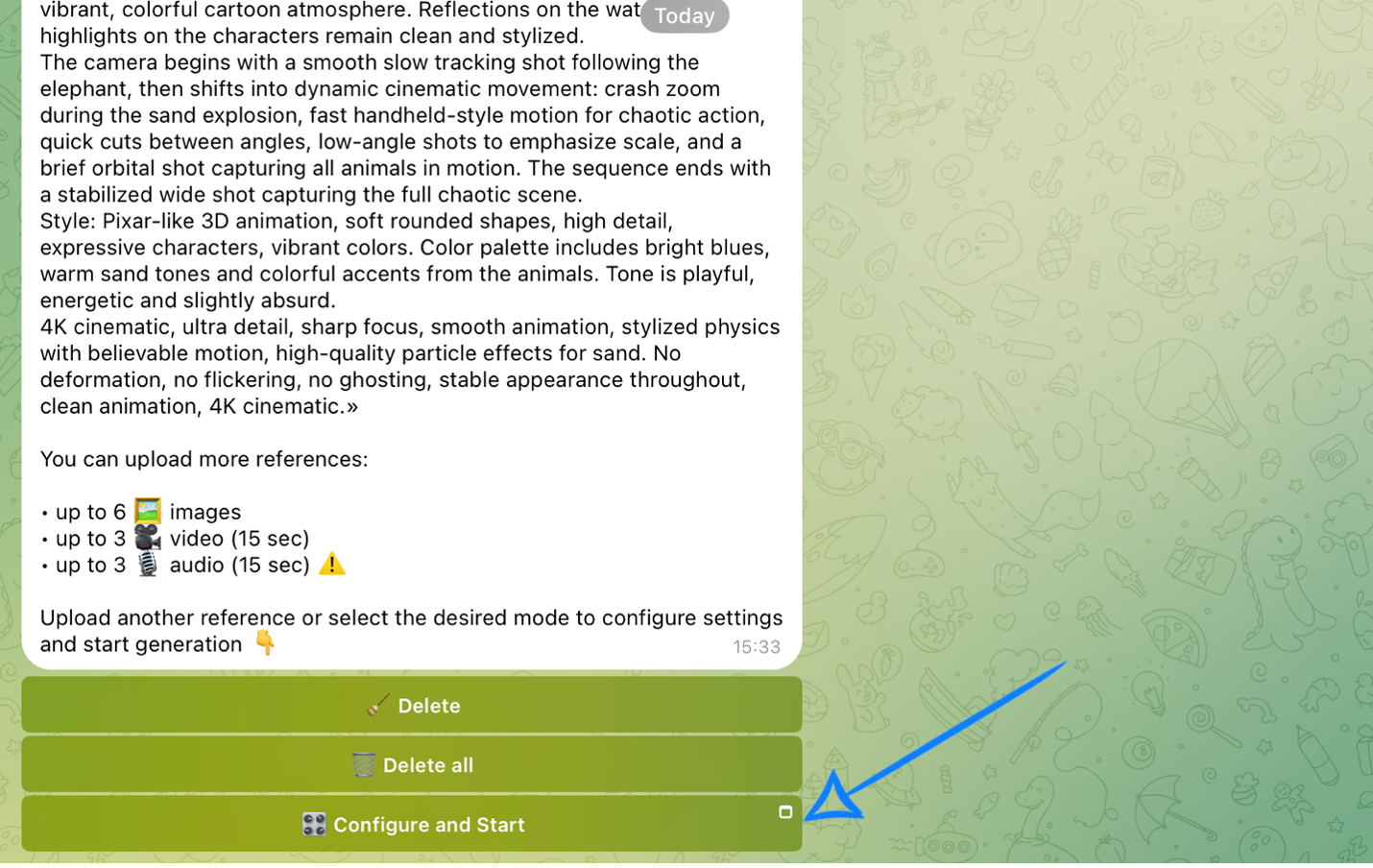
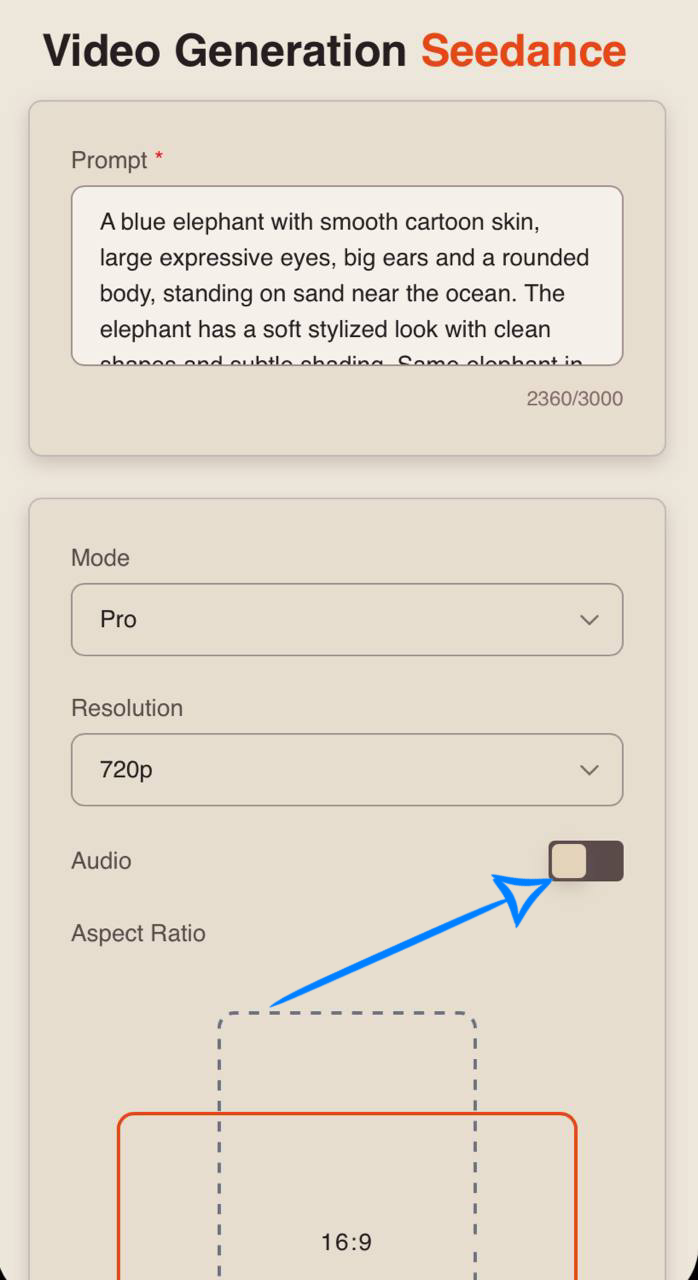
After submitting your text prompt, click the “Configure and Start” button and then properly adjust the settings for the upcoming generation.
❣️ If you want to delete a submitted prompt, click “Delete” or “Delete all.” After that, you will be able to submit a new prompt.
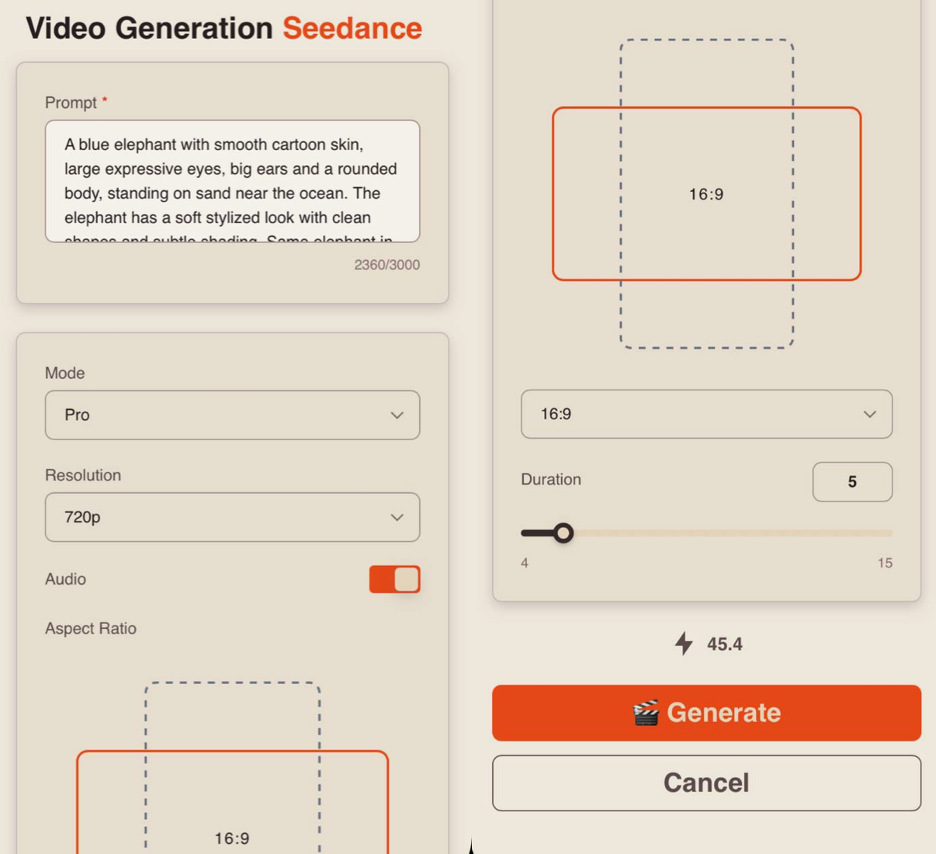
Prompt
If needed, you can edit your request in the prompt field. If left unchanged, the system will use the original text prompt you submitted.
Mode
When working with a text prompt, you can choose between two modes:
Pro - a high-quality generation mode. It provides more detailed visuals, realistic animation, and precise scene rendering, making it ideal for final videos.
Fast - a quick generation mode, ideal for testing. It allows you to rapidly iterate on ideas and scenarios but may be less detailed and precise. It also has a more limited set of quality settings.
Resolution
When working with a text prompt, you can choose from three resolution options:
-
480p
Basic video resolution. Ideal for viewing on small mobile screens and reducing data usage. The video may appear slightly blurry, and fine details may not be very sharp. -
720p
Medium resolution. Provides a good balance between quality and file size. This is a widely used standard for online video, including platforms like YouTube, and offers a clear image suitable for most modern devices and medium-sized screens. -
1080p
High-quality video resolution with excellent detail and sharpness. Ideal for large screens and TVs. It requires a faster internet connection and more storage space, but delivers the best visual quality.
❣️ 1080p resolution is available only in Pro mode.
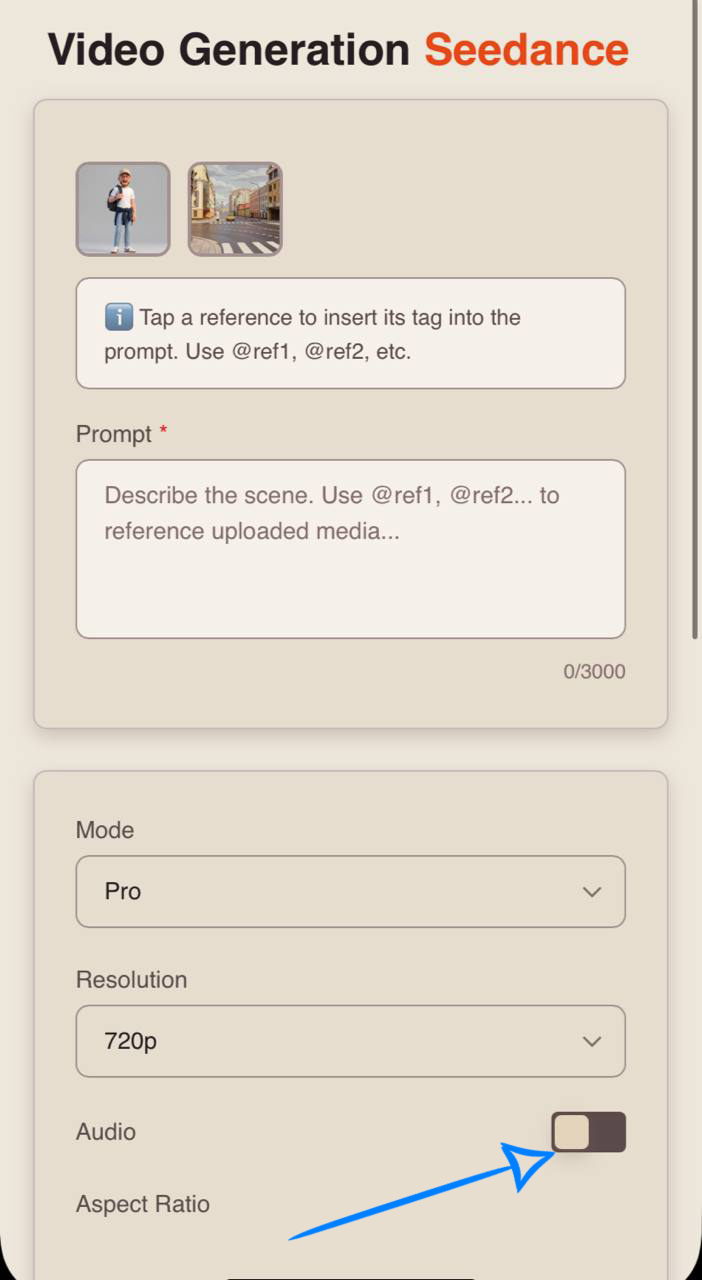
Audio
When working in Seedance 2.0, you also have the option to generate video with audio.
To add sound effects, simply enable the toggle - the neural network will automatically select and apply suitable audio.
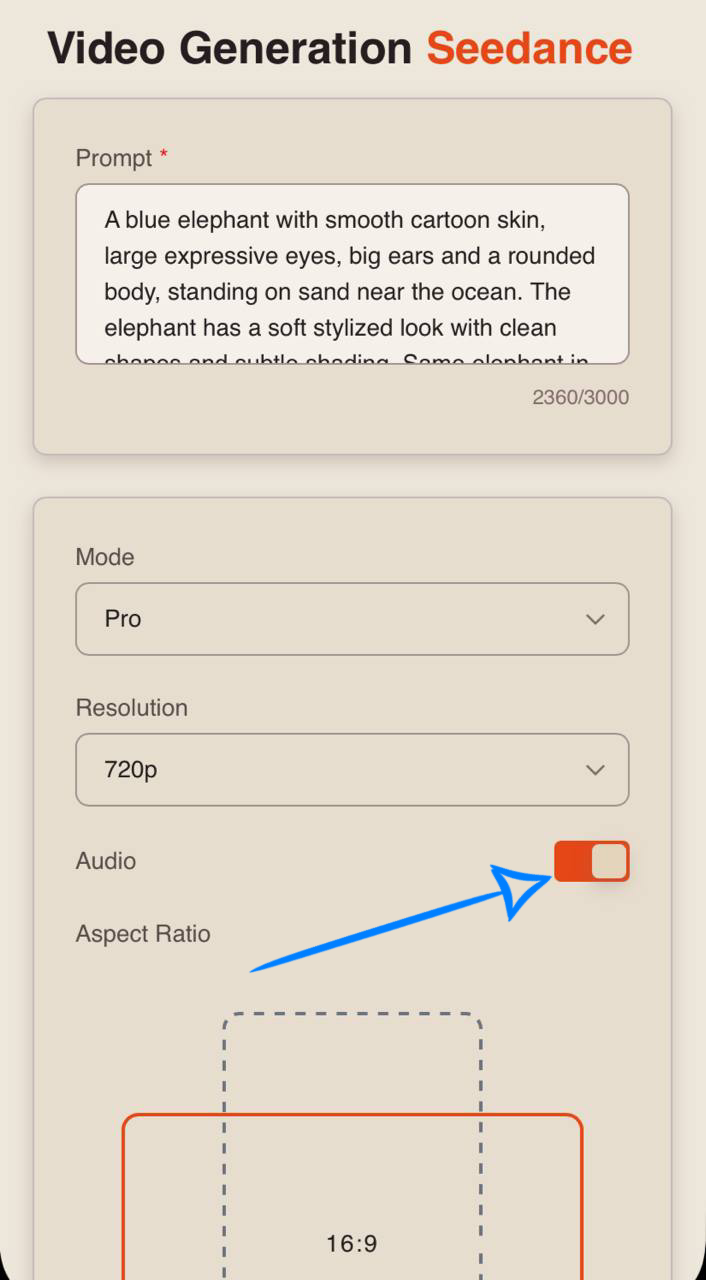
If you prefer generating video without sound, simply turn off the toggle.
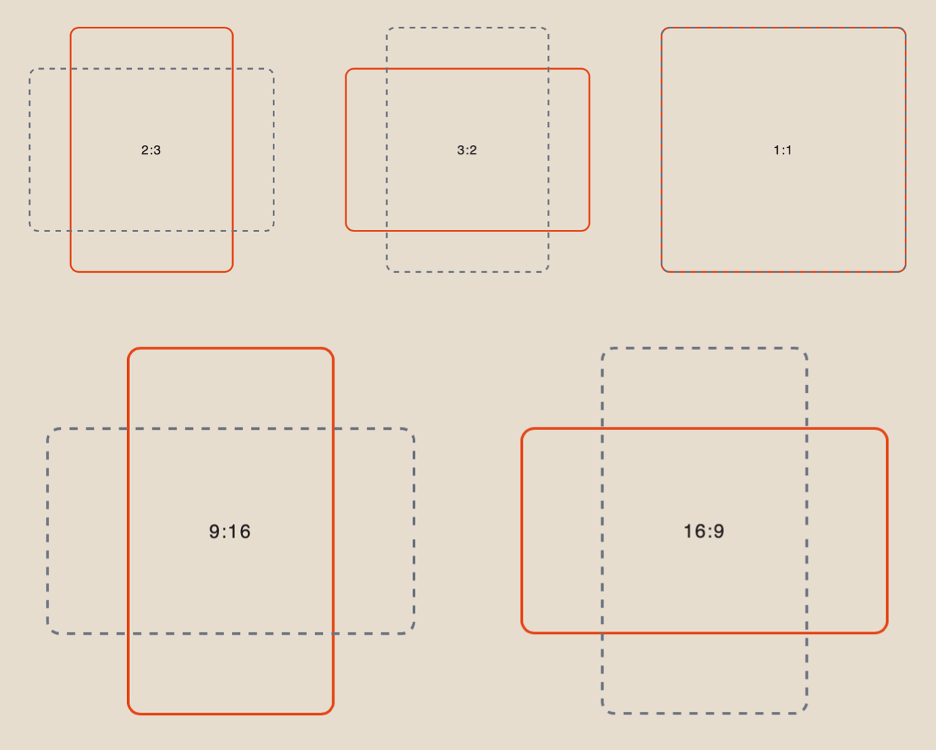
Aspect Ratio
When working with a text prompt, you have 6 aspect ratio options to choose from:
Duration
You can set the length of the generated video from 1 to 15 seconds.
❣️ Please note that the default duration in the settings is 4 seconds.
Generation Examples:
«A 27-year-old woman with long dark hair, pale skin, sharp facial features and a slim build. Same person in all shots. Preserve exact appearance throughout. Stable face throughout. She wears a modern black tailored suit with a fitted blazer, minimalistic design, matte fabric with subtle reflections.
Visual style: luxury minimalism, high contrast, monochrome palette with black, white and silver tones, soft cinematic lighting, clean reflections, premium aesthetic. Location: a large modern glass corridor with polished floors, floor-to-ceiling windows, and city skyline visible outside. Environment remains consistent throughout.
She walks forward with slow, confident steps, her reflection clearly visible on the glossy floor. As she moves, the environment subtly reacts — light shifts across the glass surfaces, reflections stretch and realign. She stops, slightly adjusts her sleeve, then continues walking. Midway, she turns sharply, and the camera shifts perspective, creating a dynamic visual transition. She places her hand on the glass wall, and a subtle ripple of light spreads outward. She resumes walking, then stops and looks directly into the camera with a calm, confident expression.
Camera: smooth tracking shots, low angles, slow push-ins and controlled orbital movement, stabilized cinematic motion, 35mm lens.
4K cinematic, ultra high detail, realistic reflections, volumetric lighting, high motion clarity. Stable face throughout. No morphing. No deformation. No flickering. No ghosting.»
«A fashion lifestyle lookbook shot from the top down, cinematic quality, ultra-high 8K resolution, smooth transitions, clean composition, soft realistic aesthetic with a cozy yet premium mood. Fixed overhead view (bird’s eye view), camera locked in position. A modern neutral-toned sofa placed in the center of a minimalistic apartment interior. Surroundings subtly change with props, but the base environment remains consistent. Clean textures, warm light, realistic materials. A young blonde woman with long soft hair, light skin, delicate facial features and expressive eyes, lying on the sofa in the same position throughout all scenes. Same person in all shots. Preserve exact appearance throughout. Stable face throughout. Only her outfits, props and small movements change smoothly.
[00:00–00:03] She is sleeping under a soft blanket, gentle breathing, hair spread on the pillow, morning light slowly filling the space.
[00:03–00:05] Instant transition — she now wears a fabric face mask with cucumber slices on her eyes, a small tray with skincare items appears, she slightly adjusts the mask in a relaxed mood.
[00:05–00:07] Soft transition — she is in a light home outfit, a breakfast tray appears with coffee and a croissant, she takes a slow bite, calm expression.
[00:07–00:09] Instant transition — a laptop appears on her lap, she types quickly, focused, a phone and notebook lie nearby.
[00:09–00:11] Hard transition — she is now more dressed, talking on the phone with a slightly irritated expression, gesturing with her free hand, movement becomes more active.
[00:11–00:13] Smooth transition — she is wearing an elegant party dress, a mirror and makeup items appear, she adjusts her hair and checks her look confidently.
[00:13–00:15] Final hold — she looks directly up toward the camera, fully ready for the party, confident and slightly playful expression, clean composition, minimal props.Realistic natural sound design only, no music. Soft breathing, fabric movement, subtle sofa creaks, ambient room tone, light kitchen sounds during breakfast, keyboard typing, phone handling sounds, subtle voice during the call, natural object interaction sounds, all synchronized with actions.
Lighting: soft global illumination, warm indoor tones, gentle shadows, cinematic clean look, high quality render. Camera: fixed top-down shot, no movement, transitions and actions create the dynamic. 4K cinematic, high detail, realistic materials, smooth transitions. Stable face throughout. No morphing. No deformation. No flickering. No ghosting.»
«Key Concept: High-speed fashion photoshoot with rapid pose and styling changes within a single studio location, creating the effect of a continuous editorial shoot where each cut reveals a new pose, outfit variation, and prop change. Strong fashion energy, stylish and expressive. Final moment slows down for a confident closing pose. Transition mechanics: fast snap cuts with subtle motion blur, each cut introduces a new pose and slight prop or styling variation while staying in the same studio space. Character: young woman, early 20s, long pink hair, slim build, clear skin, defined facial features, confident and expressive, high-fashion presence, same character throughout with strict consistency. Setting: single professional photo studio with neutral seamless backdrop, controlled lighting setup, props changing between cuts (chair, fabric, fan, light panels, mirror).
[0:00–0:02] Medium shot, stabilized camera. The model stands in a clean studio setup, long pink hair flowing, wearing a stylish outfit, strong direct eye contact. Snap cut begins.
[0:02–0:03] Cut to new pose, hand near face, sharper expression, slight lighting shift.
[0:03–0:04] Full body shot, strong silhouette, a chair appears as prop, outfit variation visible.
[0:04–0:05] Close-up, focus on face and pink hair texture, soft highlights.
[0:05–0:06] Dynamic pose mid-movement, fabric slightly flowing, prop changes to fabric backdrop.
[0:06–0:07] Seated pose using chair, relaxed but confident posture.
[0:07–0:08] Cut to standing pose with fan blowing hair, more dynamic energy, hair movement emphasized.
[0:08–0:09] Close-up with mirror prop, reflection briefly visible, subtle head tilt.
[0:09–0:10] Full body pose, sharper angular stance, lighting becomes slightly more contrasty.
[0:10–0:11] Quick turn pose, mid-motion freeze-like fashion moment.
[0:11–0:12] Leaning pose against minimal prop, calm confident expression.
[0:12–0:13] Close-up, direct eye contact, minimal movement, strong editorial frame.
[0:13–0:15] Final sequence slows down. Clean studio frame with minimal props. Model holds a strong final pose, slight head tilt and micro-expression. Camera slowly pulls back to reveal full composition, ending on a polished fashion editorial look.Stabilized camera, fast snap transitions with subtle motion blur, consistent character appearance throughout, no face changes, realistic fabric and hair movement, clean fashion lighting, no flickering, no ghosting, stable image, realistic motion, 4K cinematic quality.»
«[0–3s] A hamster chef with fluffy beige fur and round cheeks cracks its tiny paws, adjusts a small chef hat with a confident smirk, camera zooms in. It begins rapidly chopping vegetables for ramen, movements lightning-fast, pieces falling perfectly into a bowl while scraps neatly fly aside.
[4–7s] Transition into a fast-paced montage: noodles are tossed into the air and softly fall back, broth pours into the bowl with a glossy shine, green onions are sliced with machine-gun precision, droplets of broth sparkle in the light, the hamster whisks ingredients so fast its body slightly vibrates.
[8–11s] It spins 360 degrees, carefully assembling the ramen: placing noodles, adding eggs, greens, and meat with surgical precision, tongue slightly out in concentration. It pushes the bowl forward with one confident motion, warm steam rising as soft light illuminates its face.
[12–15s] The hamster lifts the finished bowl of ramen, gently blows on it, then happily tastes the noodles. After that, it holds the dish in front of its chest with both paws, looks into the camera with a proud smile and winks. Final glossy highlight on the surface of the broth.
Style: Pixar-like 3D animation, soft shapes, high detail, warm volumetric lighting, cozy kitchen atmosphere. Sound: chopping, simmering broth, mixing, light sizzling, finishing with a warm musical accent.
4K Ultra HD, high detail, sharp image, cinematic texture, stable frame. Maintain character consistency, no distortion, smooth animation.»
💥 Step-by-Step Guide to Using Seedance 2.0 “Working with References”
When working with images, the first step is to upload them correctly.
Uploading Images
Technical requirements for images:
- Supported formats: JPG and PNG
- Maximum file size: up to 10 MB
- Maximum number of uploaded images: up to 6
For example:
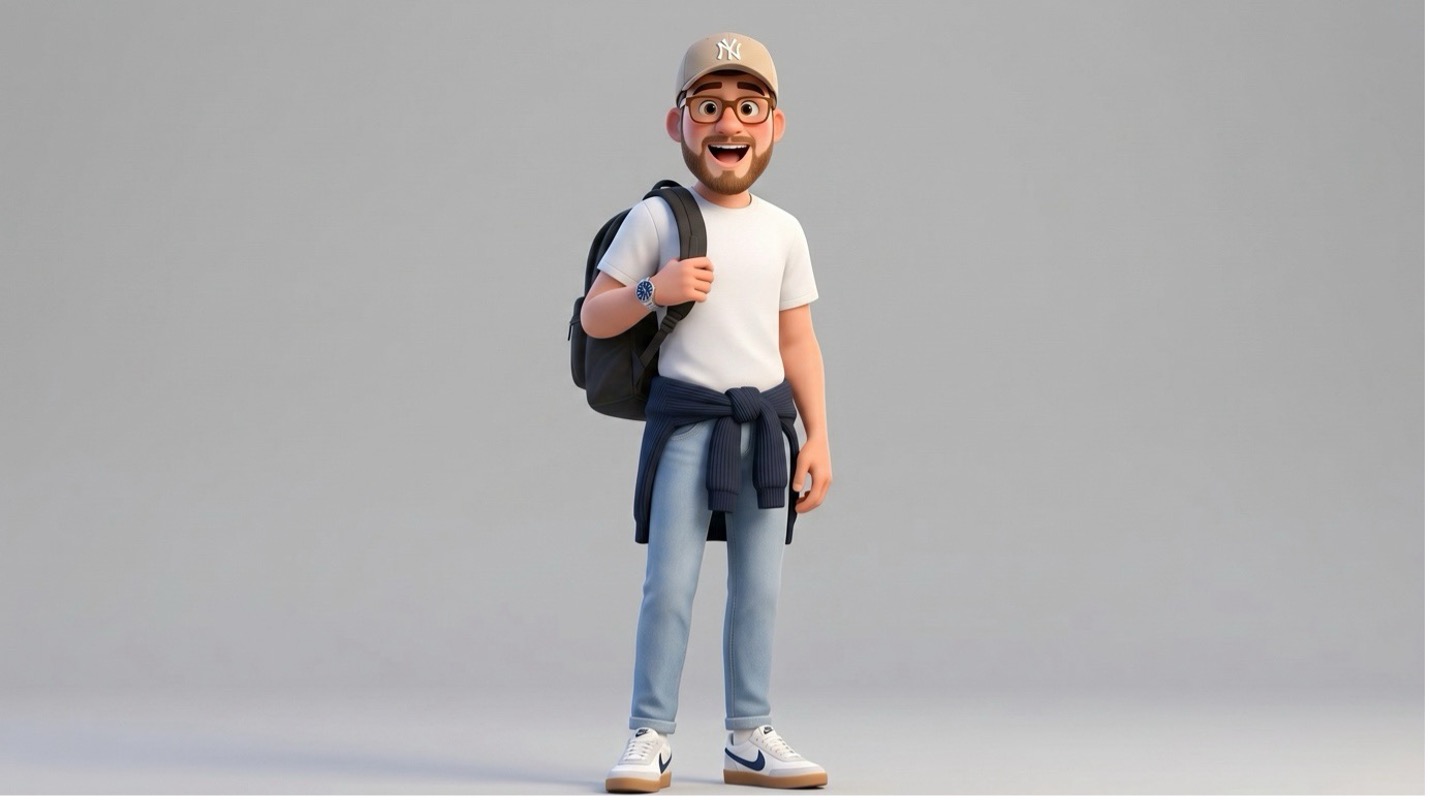
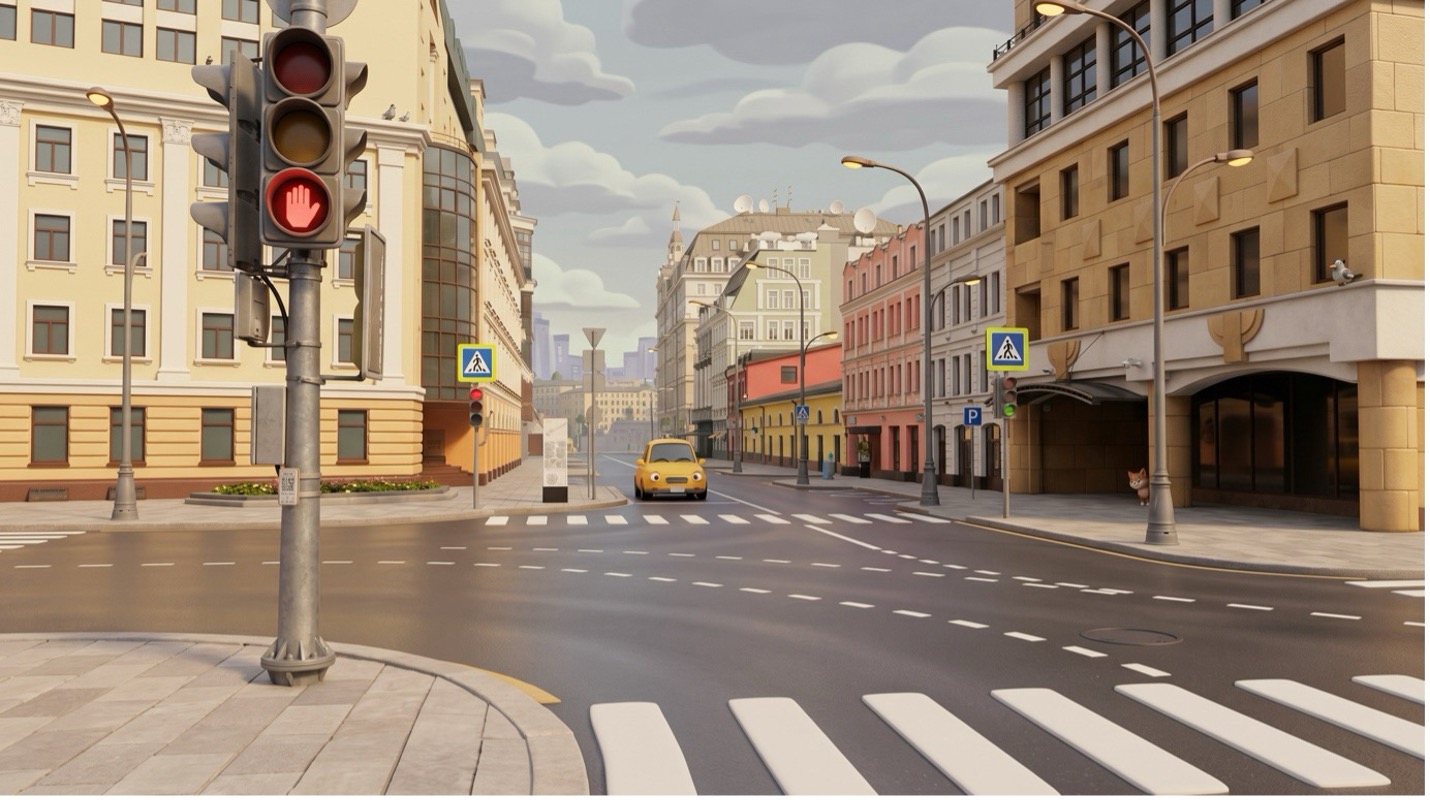
Working with a Single Image
Model Settings
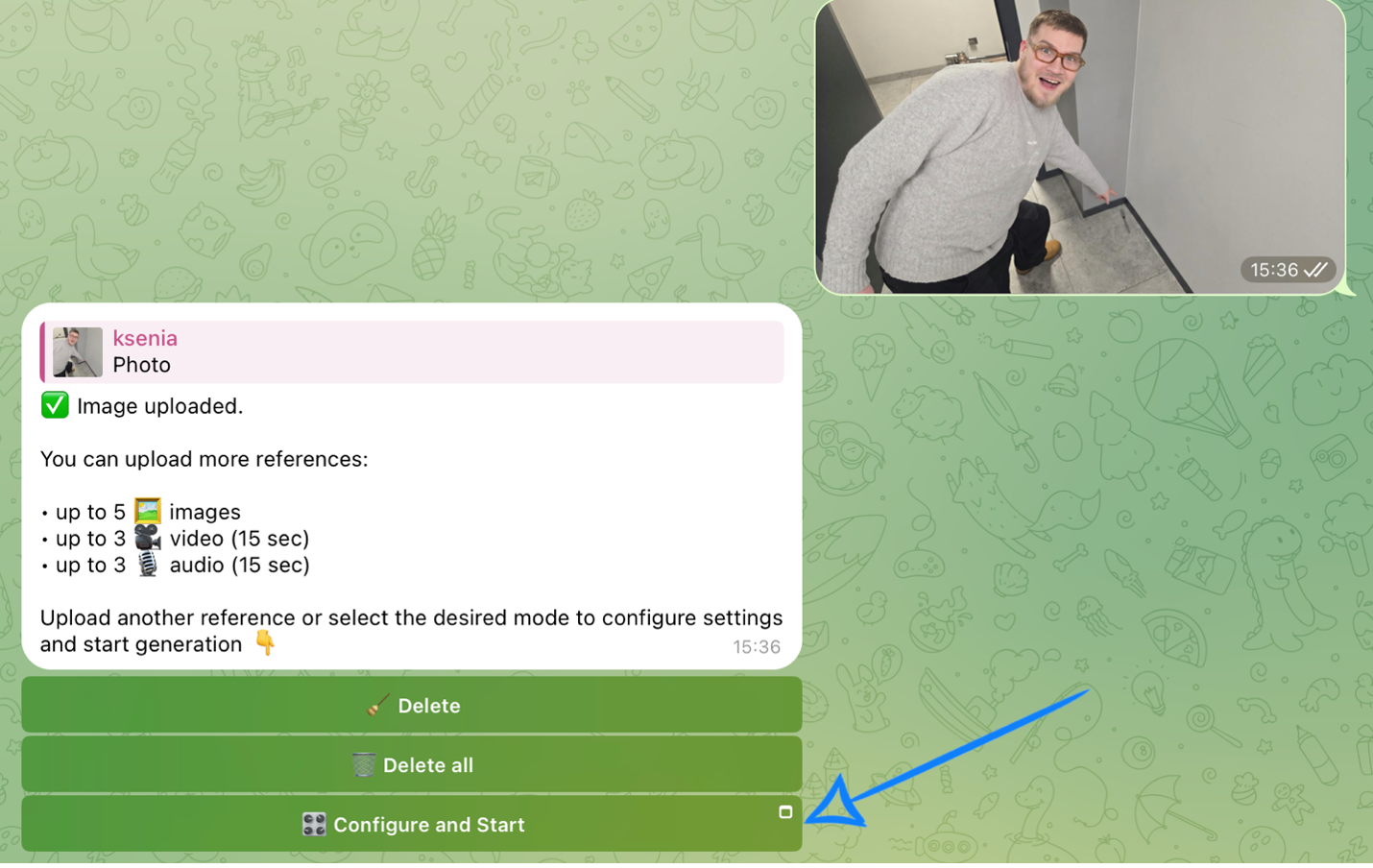
After uploading an image, click “Configure and Start” and then correctly set the options for the upcoming generation.
❣️ If you want to delete the uploaded image, click “Delete” or “Delete all.” After that, you will be able to submit a new request.
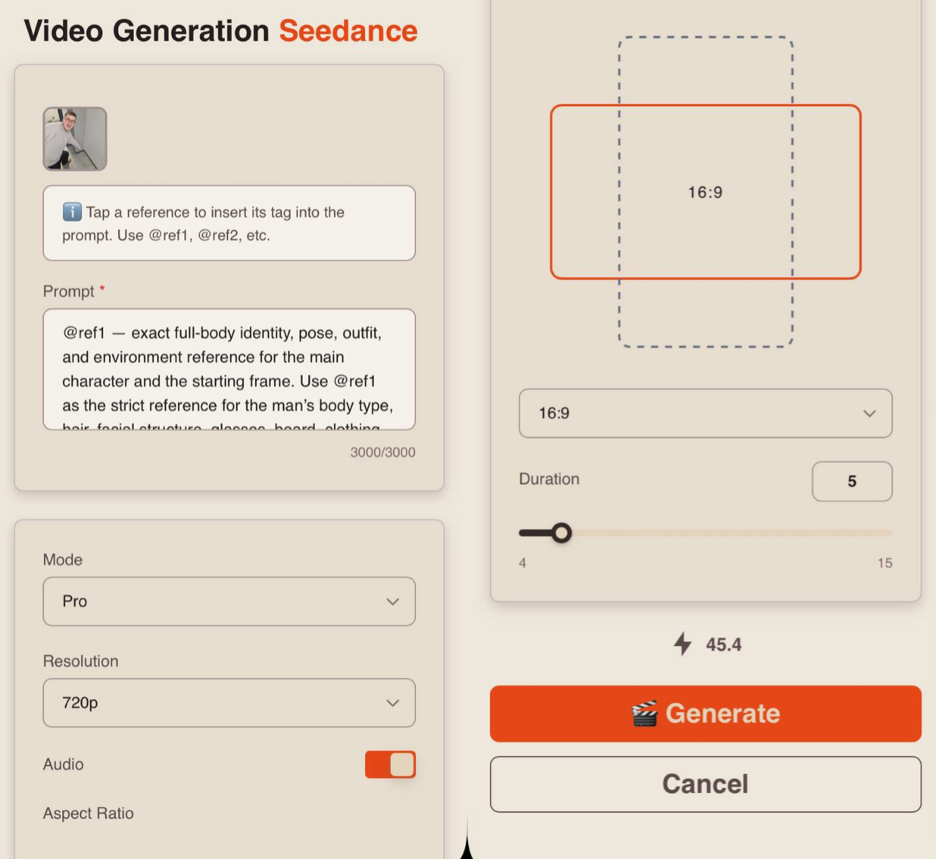
Prompt
High-quality generation directly depends on how accurately and consistently the scene is described.
It is important not only to present the idea, but also to clearly define the character, environment, and behavior in order to avoid distortions, inconsistencies, and random changes during generation.
A good text prompt should include:
- Character / Object Description
At this stage, describe the appearance of the character or object in as much detail as possible. Include key features: face, body type, hairstyle, clothing, materials, shape, color, and other visual details. If the same character or object appears throughout the video, state this separately so the model preserves their appearance during the entire generation, for example:
“Same person in all shots. Preserve exact appearance throughout. Stable face throughout.”
- Action
Clearly describe what the character or object is doing, the sequence of actions, and how they interact with the environment. Use specific wording. Instead of “walks beautifully,” write:
“Walks forward confidently, turns their head toward the camera, adjusts the collar.”
The more precise and logical the movements are, the more stable, coherent, and understandable the final result will be.
- Location
Describe and define the space where the scene takes place in detail: interior or exterior, object placement, atmosphere, background, and important environmental details.
- Lighting
Lighting sets the mood and depth of the scene, so it is recommended to specify it separately. You can describe the light source, its quality, and color: soft daylight, harsh backlight, warm volumetric lighting, neon accents, etc.
- Camera Movement
Specify the shot type and camera movement, as they define the dynamics of the video. You can combine different approaches: smooth fly-throughs, sharp zoom-ins, angle changes, etc.
- Constraints and Stability
At the end of the prompt, it is recommended to define technical constraints that help make the result cleaner and more stable. Usually, this includes the absence of distortions, flickering, deformations, and random changes in the face, clothing, or scene, for example:
“No deformation. No flickering. No ghosting. Stable face throughout. Realistic physics.”
Additional Recommendations
- Avoid vague wording such as “beautiful,” “interesting,” or “cool,” as it does not give the model a clear understanding of the desired result.
- If necessary, break the scenario into time segments, for example [0–3s] and [3–6s], for more precise control over dynamics and the sequence of actions.
- When working with characters, define and maintain their appearance and behavior to avoid random changes.
- It is recommended to write prompts in English, as the model interprets English wording more accurately and better understands details, styles, and camera movements. This is especially important for complex scenes and dynamic videos where high precision is required.
- The more detailed and precise the prompt is, the higher-quality and more predictable the result will be.
Tag System
The key feature when working with references in this tool is the tag system.
To add a tag to your prompt, simply click on the thumbnail of the desired image - the tag will be automatically inserted into the prompt field.
This helps the neural network understand more accurately which image should be used in a specific part of the prompt.
For example:
«@ref1 — exact full-body identity, pose, outfit, and environment reference for the main character and the starting frame. Use @ref1 as the strict reference for the man’s body type, hair, facial structure, glasses, beard, clothing, posture, pointing gesture, room layout, gray walls, floor tiles, corner geometry, and the fork on the floor. Main character is an adult male with short brown hair, light skin, glasses, short beard, average heavyset build, wearing a light gray knit sweater, dark loose pants, and tan shoes. Preserve exact likeness throughout. No beautification. No deformation. Stable face throughout.
Visual style and color palette: cinematic live-action fantasy realism, grounded modern interior lighting, subtle 35mm film grain, realistic materials, soft neutral gray walls, cool concrete-gray floor tiles, charcoal trim, pale beige skin tones, warm golden magical light, glowing amber runes, volumetric dust, soft white portal core, controlled contrast, dramatic but believable supernatural lighting.
Location and atmosphere: a plain indoor hallway corner matching @ref1 exactly, with gray painted walls, black-gray base trim, light speckled tile floor, and a metal fork lying near the wall. The space begins as an ordinary modern interior, quiet and still, then transforms into a supernatural event localized around the fork. The magic feels ancient, luminous, and physically powerful, while the environment remains realistic and grounded.
[0:00-0:03] Medium wide shot, stabilized camera, slow push in from slightly above waist level, matching the perspective of @ref1. The man is crouched and pointing directly at the fork on the floor near the wall corner. He studies it with cautious curiosity. As his finger hovers toward it, a faint circle of glowing magical symbols begins to appear around him on the floor, tracing itself outward in amber light. The runes rotate slowly and cast soft reflections onto the tiles. 4K cinematic, IMAX quality.
[0:03-0:06] Closer medium shot, handheld with subtle tension shake. The magical circle around him brightens and completes itself, surrounding his feet and expanding toward the fork. Additional floating rune fragments rise in the air around his arm and shoulder. He notices the change and shifts his balance, startled but still pointing. The fork begins to vibrate slightly on the floor. Dust grains and tiny debris start to lift from the tiles as energy gathers in the corner.
[0:06-0:09] Low-angle close shot focused on the fork and floor, stabilized camera with a slow arc move. The tile directly beneath the fork darkens and opens into a circular bottomless portal, edged with molten-looking glowing symbols. A blinding white-gold light erupts upward from inside the portal. The fork hovers above the opening, trembling in the beam. Wind starts blasting outward from the portal, pushing dust and loose particles across the floor and rippling the man’s sweater hem.
[0:09-0:12] Dynamic medium shot, handheld with stronger shake for impact. The portal expands slightly and releases a powerful upward burst of light, wind, and swirling dust. The man stumbles backward and braces himself, one arm thrown out for balance while the other instinctively shields his face. His sweater and pant legs whip in the wind, and his glasses catch the flare from the portal light. Use slow motion 120fps during the strongest burst of air and flying dust, then snap to real-time as he nearly loses footing.
[0:12-0:15] Wide shot, stabilized camera with a slight crane back and up. The man is barely holding his stance at the edge of the glowing symbol circle as the portal roars beneath the fork. The beam of light streams upward, dust spins through the hallway, and the rune circle around him pulses in sync with the portal. End on a dramatic frame with the ordinary gray hallway transformed by ancient magic, the man leaning against the force of the wind, and the fork suspended above the bottomless opening.
Stable face throughout. No morphing. No deformation. No flickering. No ghosting. Realistic physics. 4K cinematic.»
Result:
Mode
When working with references, you can choose between two modes:
Pro - a high-quality generation mode. It provides more detailed visuals, realistic animation, and precise scene rendering, making it ideal for final videos.
Fast - a quick generation mode, ideal for testing and rapid iteration. It allows you to quickly explore ideas and scenarios but may offer lower detail and accuracy. It also has a more limited set of quality settings.
Resolution
When working with references, you have three resolution options:
-
480p
Basic video resolution. Ideal for viewing on small mobile screens and saving data usage. The video may appear slightly blurry, and fine details will not be very sharp. -
720p
Medium resolution. Provides a good balance between video quality and file size. This format is a widely used standard for online video, including platforms like YouTube, offering a clear image suitable for most modern devices and mid-sized screens. -
1080p
High-quality video format with excellent detail and sharpness. Ideal for large screens and TVs. It requires a faster internet connection and more storage space, but delivers maximum clarity and detail.
❣️ 1080p resolution is available only in Pro mode.
Audio
When using Seedance 2.0, you can also generate videos with audio.
To add sound effects, enable the toggle - the neural network will automatically select and apply appropriate audio.
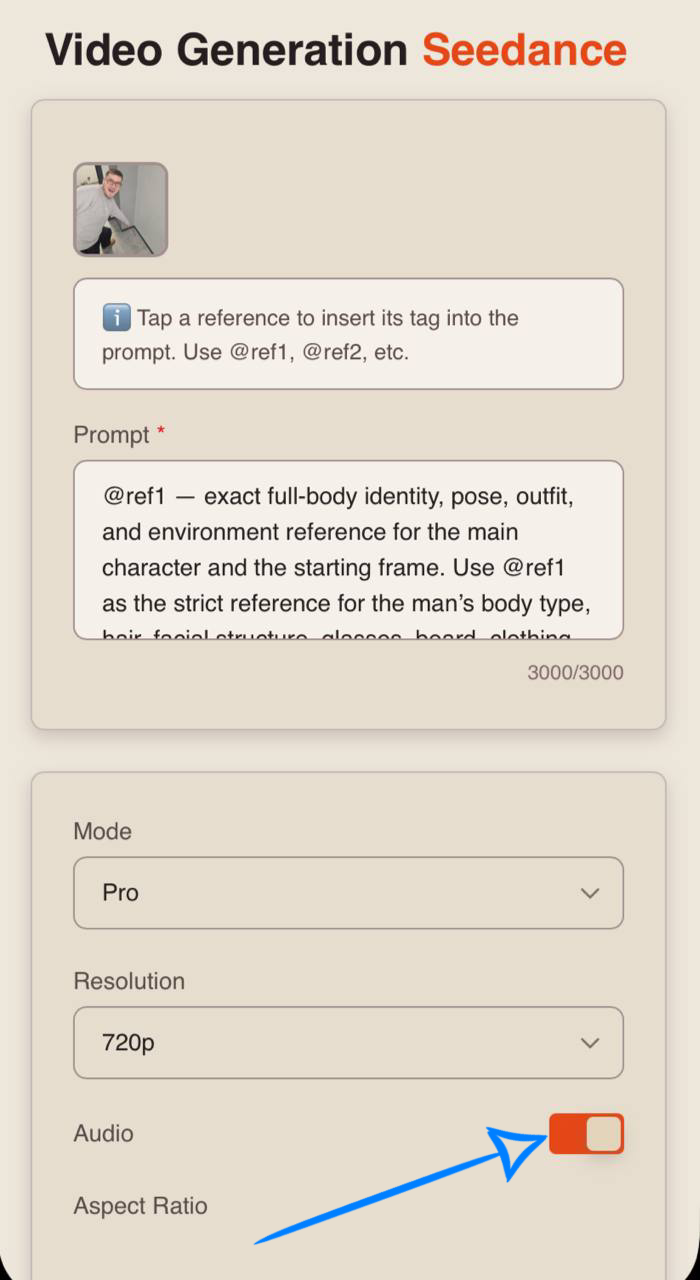
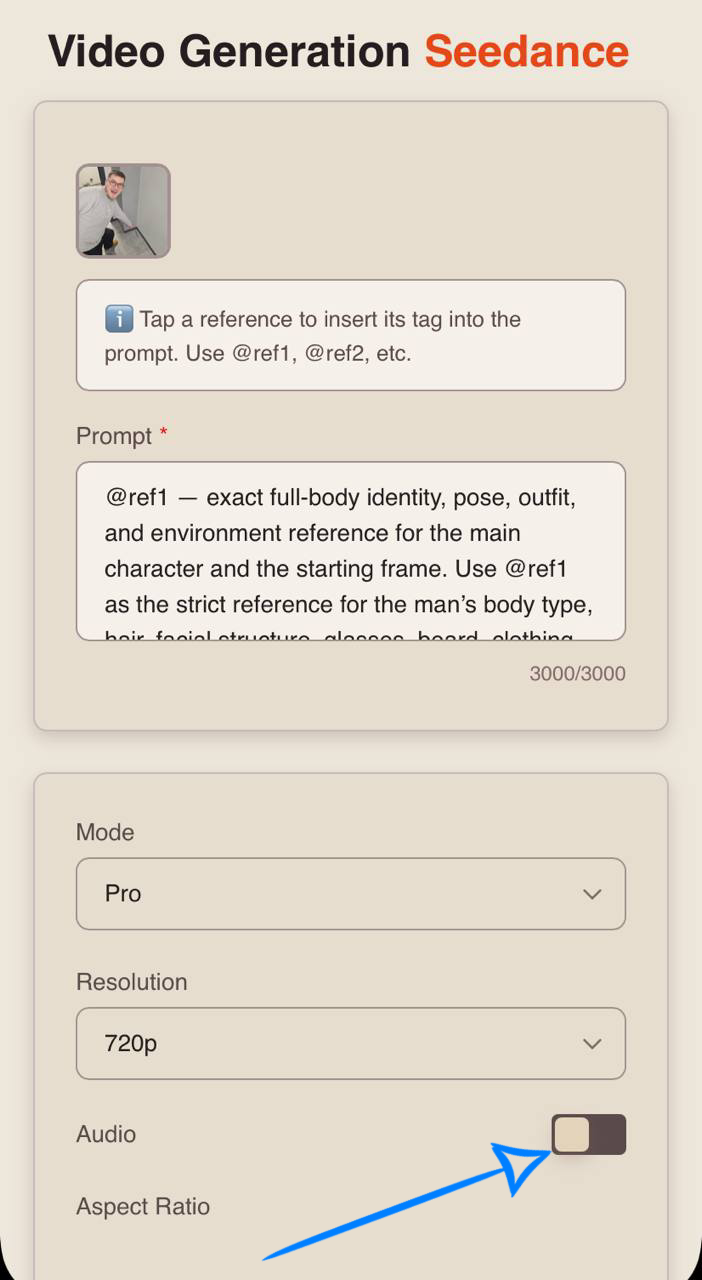
If you prefer generating video without sound, simply turn off the toggle.
Aspect Ratio
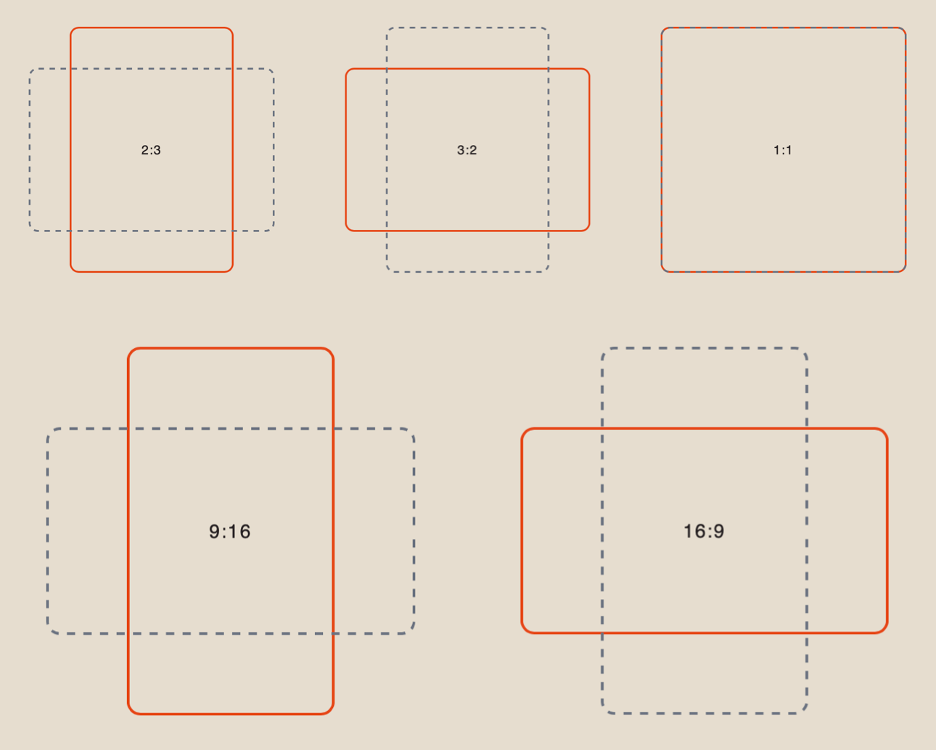
When working with references, you have 6 aspect ratio options to choose from:
Duration
You can set the length of the generated video from 1 to 15 seconds.
❣️ Please note that the default duration in the settings is 4 seconds.
Working with Multiple Images
Model Settings
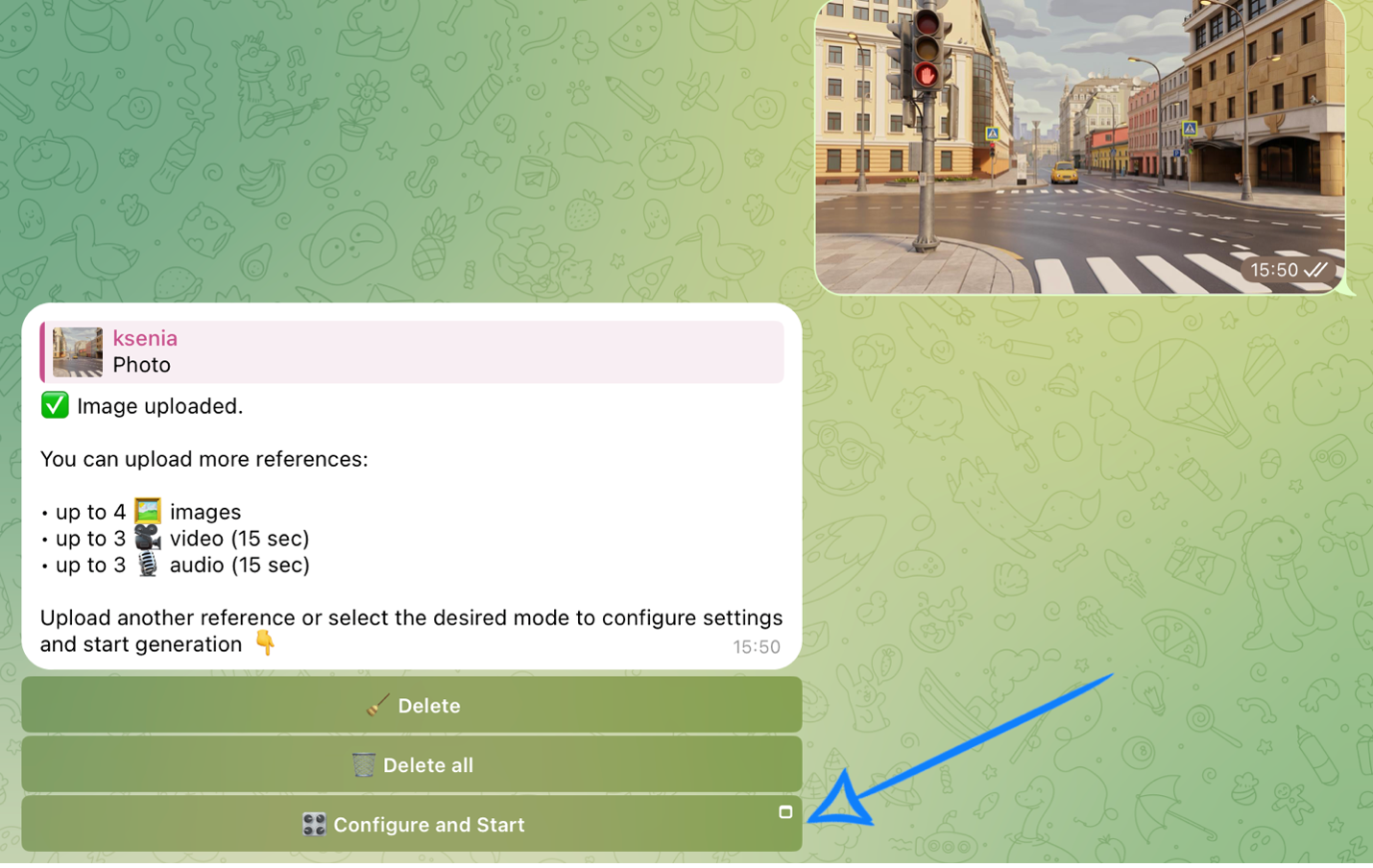
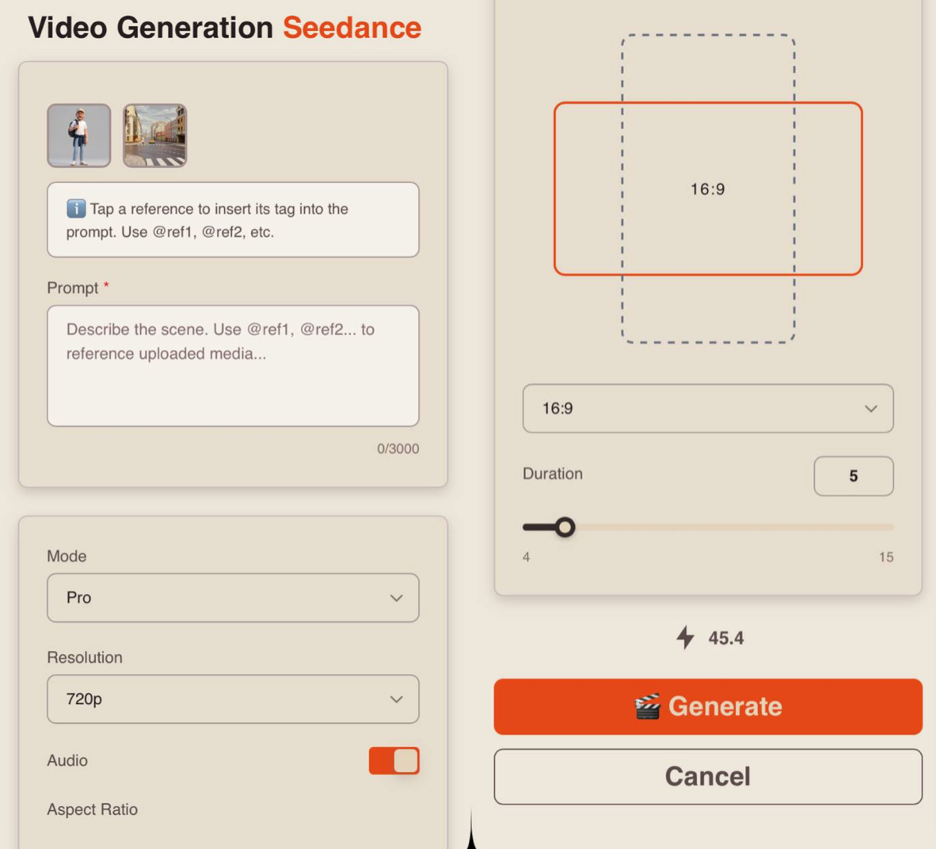
After uploading the images, click “Configure and Start” and then correctly set the parameters for the upcoming generation.
❣️ If you want to delete the uploaded images, click “Delete” or “Delete all.” After that, you will be able to submit a new request.
Prompt
High-quality generation directly depends on how accurately and consistently the scene is described. It’s important not just to set an idea, but to clearly define the character, environment, and behavior to avoid distortions and random changes during generation.
A good text prompt should include:
- Character / Object Description
At this stage, describe the appearance of the character or object in as much detail as possible. Include key features: face, body type, hairstyle, clothing, materials, shape, color, and other visual details. If the same character or object appears throughout the video, state this separately so the model preserves their appearance during the entire generation, for example:
“Same person in all shots. Preserve exact appearance throughout. Stable face throughout.”
- Action
Clearly describe what the character or object is doing, the sequence of actions, and how they interact with the environment. Use specific wording: instead of “walks beautifully,” write “walks forward confidently, turns their head toward the camera, adjusts the collar.” The more precise the movements and their logic are, the more stable and understandable the result will be.
- Location
Describe and define the space where the scene takes place in detail: interior or exterior, object placement, atmosphere, background, and important environmental details.
- Lighting
Lighting sets the mood and depth of the scene, so it is recommended to specify it separately. You can describe the light source, its quality, and color: soft daylight, harsh backlight, warm volumetric lighting, neon accents, etc.
- Camera Movement
Specify the shot type and camera movement, as they define the dynamics of the video. You can combine different approaches: smooth fly-throughs, sharp zoom-ins, angle changes, etc.
- Constraints and Stability
At the end of the prompt, it is recommended to define technical constraints that help make the result cleaner and more stable. Usually, this includes the absence of distortions, flickering, deformations, and random changes in the face, clothing, or scene, for example:
“No deformation. No flickering. No ghosting. Stable face throughout. Realistic physics.”
Additional Recommendations
- Avoid vague wording (“beautiful,” “interesting,” “cool”) — it does not give the model a clear understanding of the desired result
- If necessary, break the scenario into time segments, for example: [0–3s], [3–6s], for more precise control over dynamics and action sequence
- When working with characters, fix their appearance and behavior to avoid random changes
- It is recommended to write prompts in English, as the model interprets wording more accurately and better understands details, styles, and camera movements. This is especially important for complex scenes and dynamics where high precision is required
- The more detailed and precise the prompt, the higher-quality and more predictable the result will be
Tag System
The key feature when working with references in this tool is the tag system.
To add a tag to your prompt, simply click on the thumbnail of the desired image — the tag will be automatically inserted into the prompt field.
This helps the neural network more accurately understand which image should be used in a specific part of the prompt.
For example:
«@ref1 — exact identity reference for the main character. Use @ref1 as the strict identity reference for the man’s face, hairstyle, glasses, beard, body type, proportions, and overall likeness. Main character is an adult light-skinned male with short brown hair, glasses, short beard, average heavyset build. Preserve exact likeness throughout. No beautification. No deformation. Stable face throughout.
@ref2 — exact outfit reference for the main character. Use @ref2 as the strict wardrobe reference for the transformed streetwear sports look: black long-sleeve athletic top with white shoulder and sleeve stripes, black wide athletic pants with white side stripes, black crossbody bag, black over-ear headphones, and black sneakers with white stripes and gum soles. Apply this exact full outfit to the main character while preserving his exact identity from @ref1.
@ref3— exact environment reference for the duel scene. Use @ref3as the strict location reference for the urban alley courtyard: brick buildings, chain-link fence, sidewalk, scattered trash bags, dumpsters, small boxes, pallet, fire escape, and warm late-afternoon city light.
Visual style and color palette: cinematic live-action urban action comedy, hyper-serious dramatic tone with absurd stakes, grounded realism, 35mm film grain, high contrast late-afternoon sunlight, warm amber highlights on brick walls, cool gray pavement, black sportswear with crisp white stripe accents, dusty air, sharp shadows, premium action-film framing.
Location and atmosphere: the entire scene takes place in the alley courtyard from @ref3. Start immediately in the alley with the fork already on the ground in the center like a sacred object. The main character is already transformed into the exact outfit from @ref2. The tone is intensely serious, stylish, and exaggerated, like a legendary neighborhood duel over a completely ordinary fork. A rival emerges from the shadows and challenges him through posture and movement only. No graphic violence.
[0:00-0:03] Wide cinematic establishing shot in the alley from @ref3, stabilized camera, slow low-angle push in from street level. The main character stands in the exact outfit from @ref2, facing the center of the alley with intense focus. The ordinary fork lies on the pavement between him and an empty shadowed space near the fence. Wind moves lightly through the alley, dust drifts near the ground, and the crossbody bag and pant legs move naturally. From the shadowed side near the fence, a second adult male rival steps forward slowly. He is a different person with a different face and identity, athletic build, wearing dark urban streetwear. Both men lock eyes, then glance down at the fork.
[0:03-0:06] Medium close-ups and dramatic inserts, handheld with subtle tension shake. Tight close-up on the main character’s face: glasses, short beard, focused eyes, determined jaw. Tight close-up on the rival’s stern face. Low-angle insert on the fork resting on the pavement in the exact center between them. Close-up of shoes shifting into fighting stance. The main character circles one step left, the rival mirrors him from the opposite side. The camera slowly orbits around the fork, making it feel sacred and absurdly important.
[0:06-0:09] Dynamic action burst, aggressive handheld tracking shot. Both men suddenly sprint toward the fork at the exact same moment. The rival lunges first. The main character performs a sharp sidestep and pivots around him, using speed and body positioning rather than direct impact. He slides low across the pavement, one hand reaching toward the fork. The rival reacts instantly, cutting across and forcing a last-second miss. The camera tracks tightly with the movement, keeping the fork centered in the action.
[0:09-0:12] Fast cinematic duel sequence, mixed low-angle tracking and orbital motion. The rival jumps over the pallet and lands closer to the fork. The main character spins, regains balance, and rushes back in. Use slow motion 120fps for the most dramatic moment: both men dive for the fork at once, shoes skid across the pavement, dust kicks up, sunlight flashes across the metal fork, clothing and bag swing realistically, and the camera whips around them in a heroic circular motion. Snap to real-time as the main character narrowly gains position.
[0:12-0:15] Hero victory ending, stabilized camera with slight crane up and subtle orbit. The main character rises first and lifts the ordinary fork upright like a sacred trophy, breathing hard and looking triumphant. The rival stops and lowers his stance in disbelief, defeated by timing and precision. Warm late-afternoon sunlight hits the fork and the black sports outfit with exaggerated cinematic glory. End on a powerful absurd frame: the main character in the alley from @ref3, wearing the exact outfit from @ref2, standing like a neighborhood champion while proudly holding the completely ordinary fork.Stable face throughout. No morphing. No deformation. No flickering. No ghosting. Realistic physics. 4K cinematic.»
Result:
Mode
When working with references, you can choose between two modes:
Pro - a high-quality generation mode. It delivers more detailed visuals, realistic animation, and precise scene rendering, making it ideal for final videos.
Fast - a quick generation mode, ideal for testing and rapid iteration. It allows you to quickly experiment with ideas and scenarios but may be less detailed and precise. It also offers a more limited set of quality settings.
Resolution
When working with references, you have three resolution options:
-
480p
Basic video resolution. Ideal for viewing on small mobile screens and saving data usage. The video may appear slightly blurry, and fine details will not be very sharp. -
720p
Medium resolution. Provides a good balance between video quality and file size. This format is a widely used standard for online video, including platforms like YouTube, offering a clear image suitable for most modern devices and mid-sized screens. -
1080p
High-quality video format with excellent detail and sharpness. Ideal for large screens and TVs. It requires a faster internet connection and more storage space, but delivers maximum clarity and detail.
❣️ 1080p resolution is available only in Pro mode.
Audio
When using Seedance 2.0, you can also generate videos with audio.
To add sound effects, enable the toggle — the neural network will automatically select and apply appropriate audio.
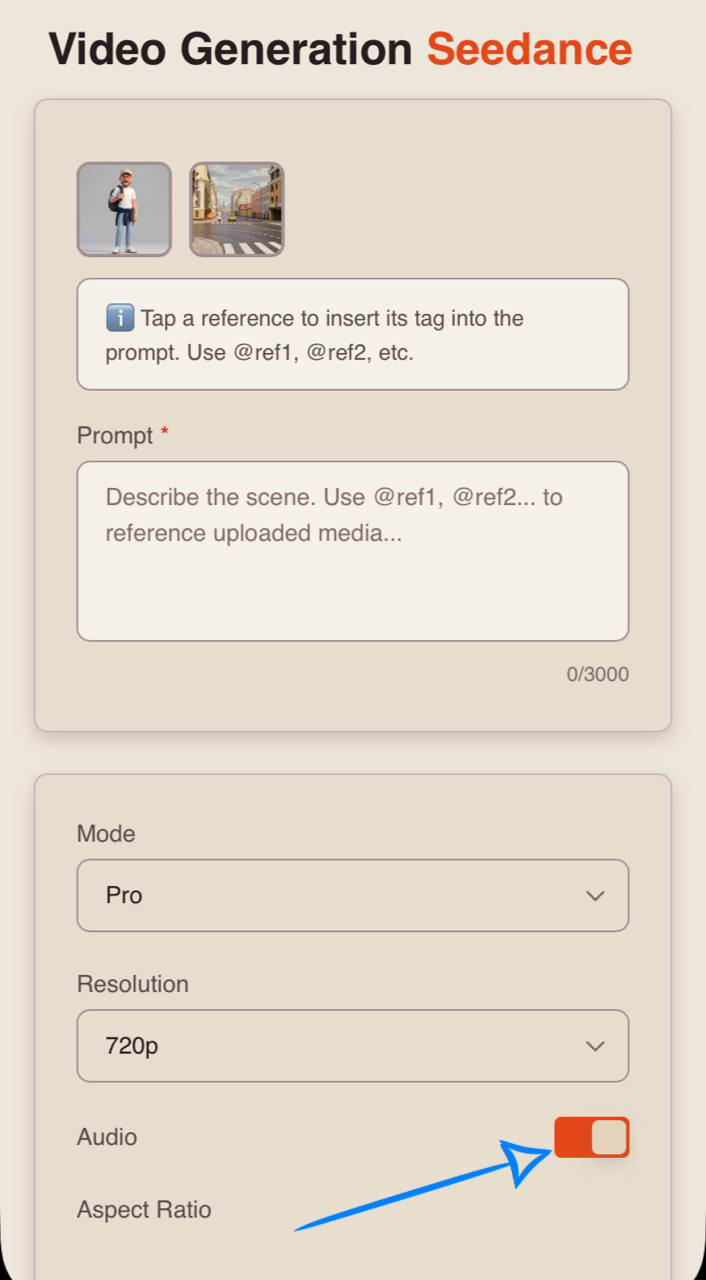
If you prefer generating video without sound, simply turn off the toggle.
Aspect Ratio
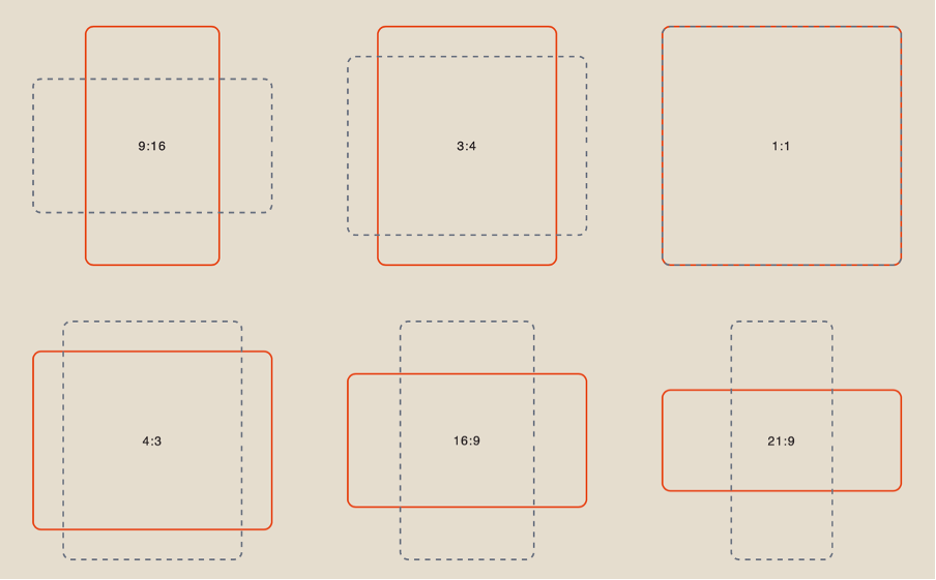
When working with references, you have 6 aspect ratio options to choose from:
Duration
You can set the length of the generated video from 1 to 15 seconds.
❣️ Please note that the default duration in the settings is 4 seconds.
Generation Examples
«@ref1 — strict identity reference for the main character only. Use @ref1 only for the man’s facial features, hairstyle, glasses, beard, body type, age, proportions, and overall likeness. The main character is an adult light-skinned male with short brown hair, glasses, a short beard, and an average heavyset build. Do not use the original pose, corridor setup, fork, or any objects from @ref1. Preserve exact likeness throughout. No beautification. No deformation. Stable face throughout.
@ref2 — exact outfit reference for the main character. Use @ref2 as the strict clothing reference for the kimono ensemble: light sage-beige haori outer robe, muted olive inner kimono layers, dark charcoal-brown pleated hakama, traditional waist ties, wide sleeves, layered fabric silhouette, and authentic formal proportions.
@ref3 — exact environment reference for the scene. Use @ref3 as the strict location reference for the urban alley courtyard: brick walls, chain-link fence, sidewalk edge, dumpsters, scattered trash bags, wooden pallet, fire escape, graffiti, and late-afternoon city light. Keep the alley layout and grounded urban atmosphere.
@ref4 — exact prop reference for the main character. Use @ref4 as the strict reference for the folding hand fan: cream paper surface, painted botanical artwork, wooden ribs, elegant traditional construction, and natural hand-held scale.
Visual style and color palette: cinematic live-action parody of an epic battle introduction, hyper-serious tone with restrained absurdity, grounded realism, IMAX quality, subtle 35mm film grain, warm amber late-afternoon sunlight, dusty beige concrete, muted red-brown brick, black iron fire escape, sage-beige kimono fabric, dark charcoal hakama, cream fan with ink-style botanical details. Premium dramatic framing, strong contrast, sharp shadows, rich fabric motion.
Location and atmosphere: the entire video takes place in the urban alley courtyard from @.
[0:00-0:03] Wide establishing shot, stabilized camera, slow low-angle push in from the sidewalk into the alley from @ref3. The main character already stands centered beyond the chain-link opening, wearing the exact kimono and hakama from @ref2 and holding the folded fan from @ref4 at his side. He is motionless, shoulders squared, staring forward with intense seriousness. Wind lightly stirs the robe sleeves and hakama pleats. The alley debris, dumpsters, fence, and fire escape remain clearly visible, making the scene feel like a grand battle intro in a completely ordinary urban courtyard.
[0:03-0:06] Medium close-up, stabilized camera with subtle forward drift. Frame the exact face from @ref1: short brown hair, glasses, short beard, focused eyes, stern expression. He slowly raises the folded fan from waist level to chest level with ritual precision, as if preparing to reveal a legendary weapon. The kimono layers from @ref2 shift naturally with the movement. Warm sunlight hits one side of his face while the background alley stays gritty and grounded.
[0:06-0:09] Heroic low-angle shot, slight orbital camera movement around the character. He snaps the folding fan open in one deliberate, dramatic motion. Emphasize the exact fan design from @ref4: cream paper, painted botanical artwork, wooden ribs. The motion is treated with exaggerated importance. The sleeves flare slightly, dust moves near the ground, and the camera circles as if introducing a final boss before battle.
[0:09-0:12] Dynamic pose sequence, handheld with controlled tension and short tracking movement. The character performs two or three intensely serious martial-looking stances using only the fan: one side-facing defensive pose, one forward-leaning challenge pose, one still upright finishing pose. Every movement is elegant and overcommitted, but there is no opponent and no combat. The comedy comes entirely from the mismatch between the alley from @ref3 and the grand cinematic seriousness of the poses.
[0:12-0:15] Final heroic tableau, stabilized slight crane up with subtle orbit. The character freezes in his ultimate “battle-ready” stance, holding the open fan near his face or shoulder, eyes locked forward with absolute conviction. The kimono from @ref2 flows softly in the alley breeze, the fan from @ref4 is clearly readable, and the exact identity from @ref1 remains fully recognizable. End like the title-card shot of an epic showdown, except nothing has happened except a sequence of dramatically serious fan poses in the middle of the alley.
Stable face throughout. No morphing. No deformation. No flickering. No ghosting. Realistic physics. 4K cinematic.»
«@ref1 — strict identity reference for the main character only. Use @ref1 only for the man’s facial features, hairstyle, glasses, beard, body type, age, proportions, and overall likeness. The main character is an adult light-skinned male with short light brown hair, glasses, a short beard, and a broad average-heavy build. Do not use the original pose, corridor, pointing gesture, or any object from @ref1. Preserve exact likeness throughout. No beautification. No deformation. Stable face throughout.
@ref2 — exact environment reference for the supermarket checkout scene. Use @ref2 as the strict location reference for the grocery checkout area: cashier station, conveyor belt, checkout monitor, scanner, bags, nearby store shelves, retail lighting, and realistic supermarket perspective. Preserve the checkout layout and supermarket atmosphere.
Visual style and color palette: cinematic absurdist comedy, grounded supermarket realism transforming into surreal imperial fantasy. Start with bright fluorescent grocery store lighting and realistic commercial color tones, then shift into grand mythic visual language with warm gold highlights, floating paper receipts, rich beige and olive fabric, saturated fruit colors, dramatic product motion, subtle 35mm film grain, IMAX quality, 4K cinematic detail.
Location and atmosphere: the video starts in a completely ordinary supermarket checkout area from @ref2. The main character uses the exact identity from @ref1. He is scanning groceries with serious focus. One exaggerated barcode beep triggers an absurd fantasy vision in which he becomes a majestic supermarket emperor. The checkout lane transforms into a ceremonial throne hall made of grocery items, shopping carts, receipts, and packaged food. The comedy comes from the extreme contrast between boring retail reality and an impossibly grand royal supermarket hallucination. At the end, everything instantly returns to normal.
[0:00-0:03] Wide establishing shot, stabilized camera, slow push in toward the checkout lane from @ref2. The main character stands at the register, scanning groceries one by one with dead-serious concentration. He looks completely ordinary and grounded in the supermarket setting. Fluorescent lights, shelves, and checkout equipment are clearly visible. The scene feels realistic and routine.
[0:03-0:06] Medium shot at the register, stabilized with subtle handheld realism. He scans another item. Then he scans one more product and the barcode beep lands with strangely dramatic emphasis. He pauses. His eyes narrow slightly behind his glasses. The checkout monitor glow reflects on his face. The atmosphere becomes subtly tense, as if something sacred or dangerous has just been activated.
[0:06-0:09] Sudden surreal transition. Crash zoom into the scanner, then hard visual shift. The supermarket reality blooms into absurd imperial fantasy. The man is now wearing the king outfit while preserving the exact face and body identity from @ref1. The checkout lane has transformed into a ceremonial throne platform built from shopping carts, stacked produce crates, receipt streamers, and glowing supermarket lights. Fruits, bread, cereal boxes, and plastic bags drift through the air in majestic slow motion 120fps. He stands upright like a crowned ruler of retail destiny.
[0:09-0:12] Full absurd fantasy escalation. Dynamic low-angle shots, orbital camera movement, dramatic crane motion. The man in king outfit slowly raises one hand or a grocery item like a royal decree. Receipt paper whips around him like banners. Shopping carts form symmetrical rows like palace guards. Packaged foods slide across polished floors like sacred offerings. His expression remains completely grave and regal, as if he truly rules this impossible supermarket kingdom. The tone is epic, ceremonial, and intentionally ridiculous.
[0:12-0:15] Hard snap back to reality. Medium close-up, stabilized camera. He is suddenly back in the normal checkout from @ref2, no king fantasy visible anymore, holding a single ordinary grocery item at the scanner. He stares forward for one beat with a dead-serious expression, as if nothing unusual happened. Then he calmly scans the item with one final normal beep. End on his exact recognizable face from @ref1 in the boring supermarket setting.
Stable face throughout. No morphing. No deformation. No flickering. No ghosting. Realistic physics. 4K cinematic.»
💥 Step-by-Step Guide to Using Seedance New “Working with Video References”
When working with video references, the first step is to upload them correctly.
Uploading Videos
Technical requirements for videos:
- File format: MP4
- Maximum file size: up to 19 MB
- Minimum resolution: 640×640
- Maximum resolution: 1284×722
- Maximum number of uploaded videos: up to 3
- Total duration of all videos: up to 15 seconds
For example:
Model Settings
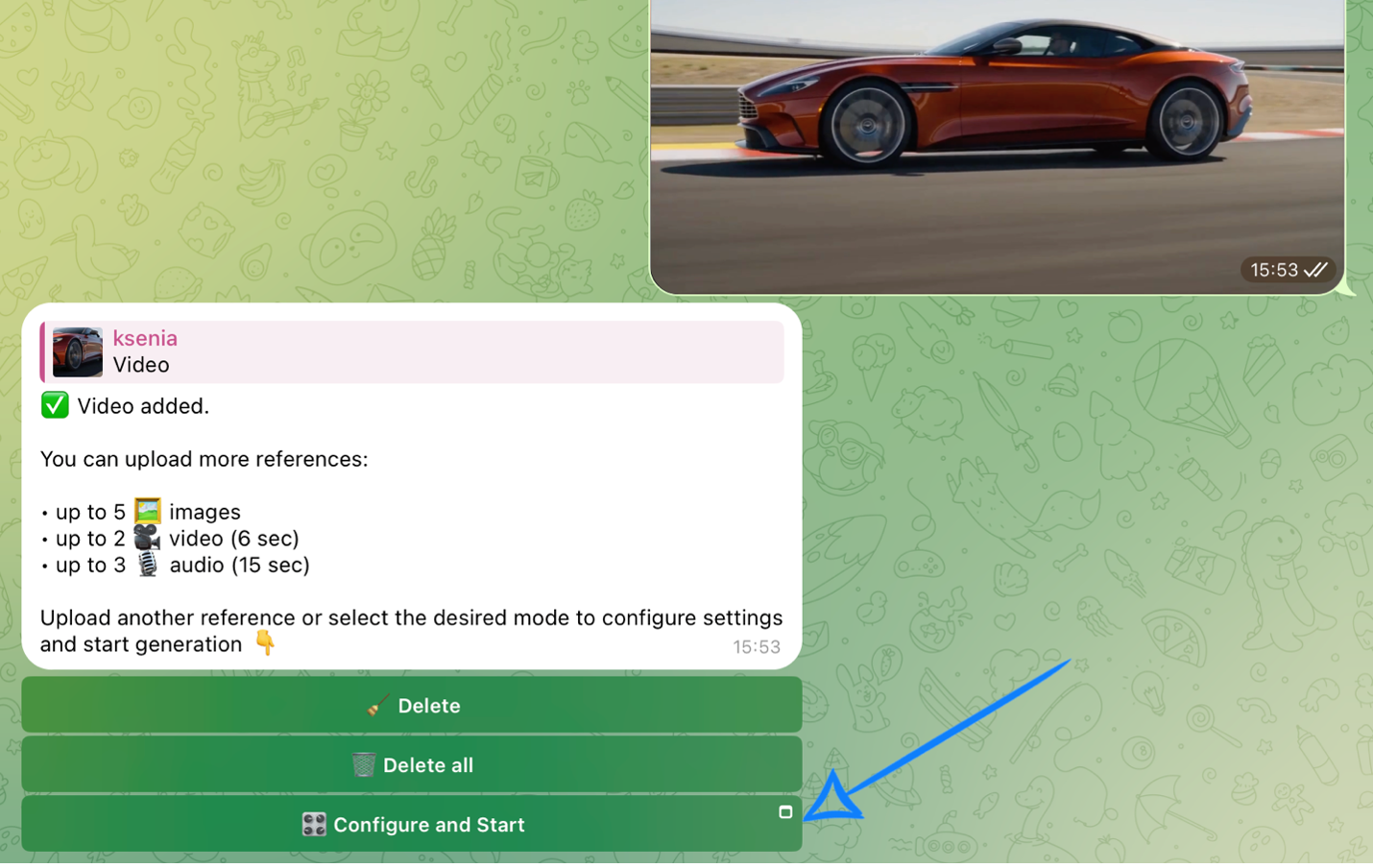
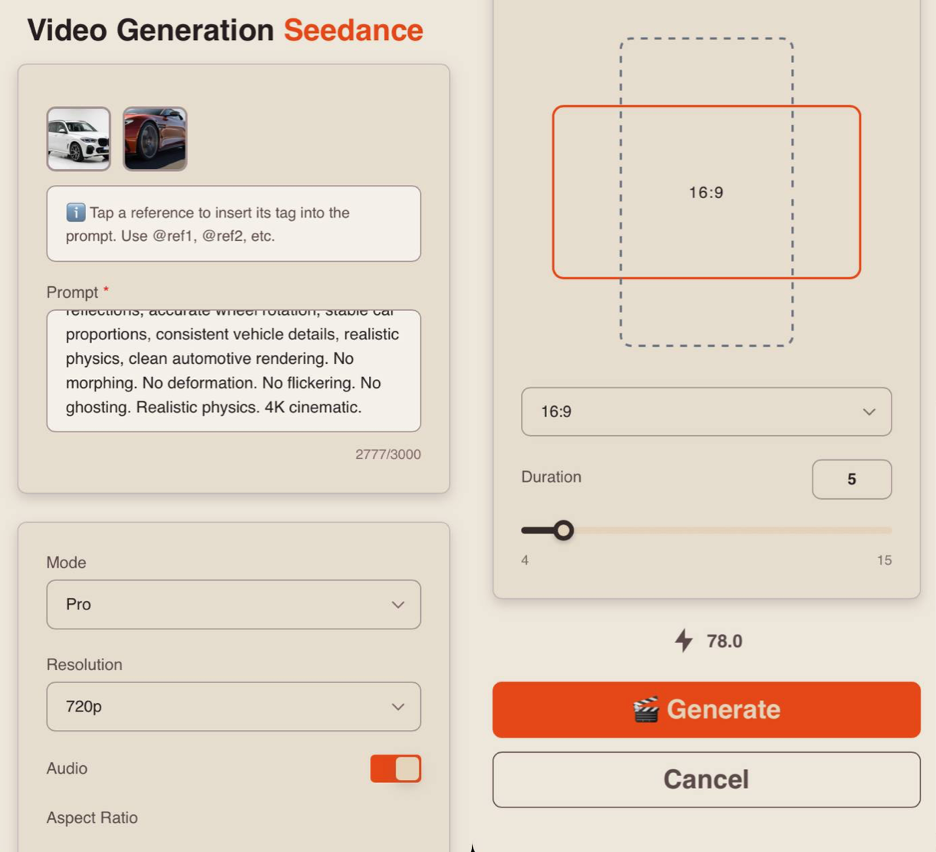
After uploading your references, click “Configure and Start” and then properly adjust the settings for the upcoming generation.
❣️ If you want to delete the uploaded references, click “Delete” or “Delete all.” After that, you will be able to submit a new request.
Prompt
High-quality generation directly depends on how accurately and consistently the scene is described. It’s important not just to present an idea, but to clearly define the character, environment, and behavior to avoid distortions and random changes during generation.
A good text prompt should include:
- Character / Object Description
Describe the appearance of the character or object in as much detail as possible. Include key features such as face, body type, hairstyle, clothing, materials, shape, color, and other visual characteristics. If the same character or object appears throughout the video, explicitly state this so the model preserves consistency. For example:
_“Same person in all shots. Preserve exact appearance throughout. Stable face throughout.”
- Action
Clearly describe what the character or object is doing, the sequence of actions, and how they interact with the environment. Use specific wording: instead of “walks beautifully,” write “walks forward confidently, turns their head toward the camera, adjusts the collar.” The more precise the movements and their logic are, the more stable and understandable the result.
- Location
Describe and define the setting in detail: interior or exterior, object placement, atmosphere, background, and important environmental details.
- Lighting
Lighting defines the mood and depth of the scene, so it is recommended to specify it separately. Describe the light source, its quality, and color: soft daylight, harsh backlight, warm volumetric lighting, neon accents, etc.
- Camera Movement
Specify the type of shot and camera movement, as these determine the video’s dynamics. You can combine approaches such as smooth fly-throughs, sharp zoom-ins, or changing angles.
- Constraints and Stability
At the end of the prompt, define technical constraints to improve stability and visual quality. This usually includes avoiding distortions, flickering, deformations, or random changes in the face, clothing, or scene. For example:
“No deformation. No flickering. No ghosting. Stable face throughout. Realistic physics.”
Additional Recommendations
- Avoid vague wording (“beautiful,” “interesting,” “cool”) — it does not give the model a clear understanding of the desired result
- Break the scenario into time segments if needed (e.g., [0–3s], [3–6s]) for better control over timing and sequence
- When working with characters, fix their appearance and behavior to prevent random changes
- It is recommended to write prompts in English, as the model interprets phrasing more accurately and better understands details, styles, and camera movements — especially important for complex scenes
- The more detailed and precise the prompt, the higher the quality and predictability of the result
Tag System
The key feature when working with references in this tool is the tag system.
To add a tag to your prompt, click on the thumbnail of the desired image — the tag will be automatically inserted into the prompt field.
This allows the neural network to more accurately understand which image should be used in a specific part of the prompt.
For example:
«@ref1 — base video reference for exact track location, shot sequence, camera angles, camera movement, transitions, timing, framing, vehicle path, pacing, and full scene structure. Replicate every shot, camera angle, movement and transition from @ref1 exactly. Keep the exact same location, background, track layout, and camera behavior from @ref1.
@ref2 — strict vehicle identity reference for the replacement car. Use @ref2 as exact appearance reference for body shape, proportions, paint finish, headlights, grille, wheels, windows, mirrors, and surface details. Preserve exact vehicle likeness throughout. Stable vehicle design throughout.
Visual style and color palette: match @ref1 exactly, premium automotive commercial look, clean reflections, balanced contrast, natural daylight tones, detailed asphalt texture, polished highlights, subtle 35mm film grain.
Location and atmosphere: keep the exact same track location, asphalt surface, lane markings, safety barriers, curbs, background elements, lighting, weather conditions, and overall atmosphere from @ref1. Replace only the original car with the vehicle from @ref2.
Vehicle description: use the exact car from @ref2 with matching body silhouette, front fascia, side profile, rear design, wheel design, paint color, glass tint, trim details, and realistic proportions. Preserve exact vehicle likeness throughout. Stable vehicle design throughout.
Motion transfer: the replacement vehicle must follow the exact same driving path, speed pattern, wheel rotation timing, cornering behavior, body motion, and screen position as the original car in @ref1. Keep the exact same choreography, pacing, and shot timing.
[0:00-3s] Replicate the opening shot from @ref1 exactly. Same framing, same camera movement, same vehicle position, same motion timing, same location details. Replace only the original car with the vehicle from @ref2.
[3:00-7s] Replicate the middle shot from @ref1 exactly. Same camera angle, same tracking behavior, same motion, same timing, same transition. Keep the environment identical to @ref1 and keep the replacement vehicle consistent with @ref2.
[7:00-10s] Replicate the final shot from @ref1 exactly. Same framing, same camera motion, same vehicle movement, same ending position or transition. Preserve the exact track environment and replace only the car.
Technical requirements: shot-for-shot remake of @ref1 with vehicle replacement only. Keep exact location, exact camera motion, exact vehicle path, exact timing, and exact transitions from @ref1. Maintain realistic reflections, accurate wheel rotation, stable car proportions, consistent vehicle details, realistic physics, clean automotive rendering. No morphing. No deformation. No flickering. No ghosting. Realistic physics. 4K cinematic.»
Mode
When working with references, you can choose between two modes:
- Pro - a high-quality generation mode. It delivers more detailed visuals, realistic animation, and precise scene rendering, making it ideal for final videos.
- Fast - a quick generation mode, ideal for testing and rapid iteration. It allows you to quickly experiment with ideas and scenarios but may be less detailed and precise. It also offers a more limited set of quality settings.
Resolution
When working with references, you have three resolution options:
-
480p
Basic video resolution. Ideal for small mobile screens and saving data usage. The video may appear slightly blurry, and fine details won’t be very sharp. -
720p
Medium resolution. Provides a good balance between quality and file size. This format is widely used for online video, including platforms like YouTube, and delivers a clear image suitable for most modern devices and mid-sized screens. -
1080p
High-quality video format with excellent detail and sharpness. Ideal for large screens and TVs. It requires a faster internet connection and more storage space, but provides maximum clarity and detail.
❣️ 1080p resolution is available only in Pro mode.
Audio
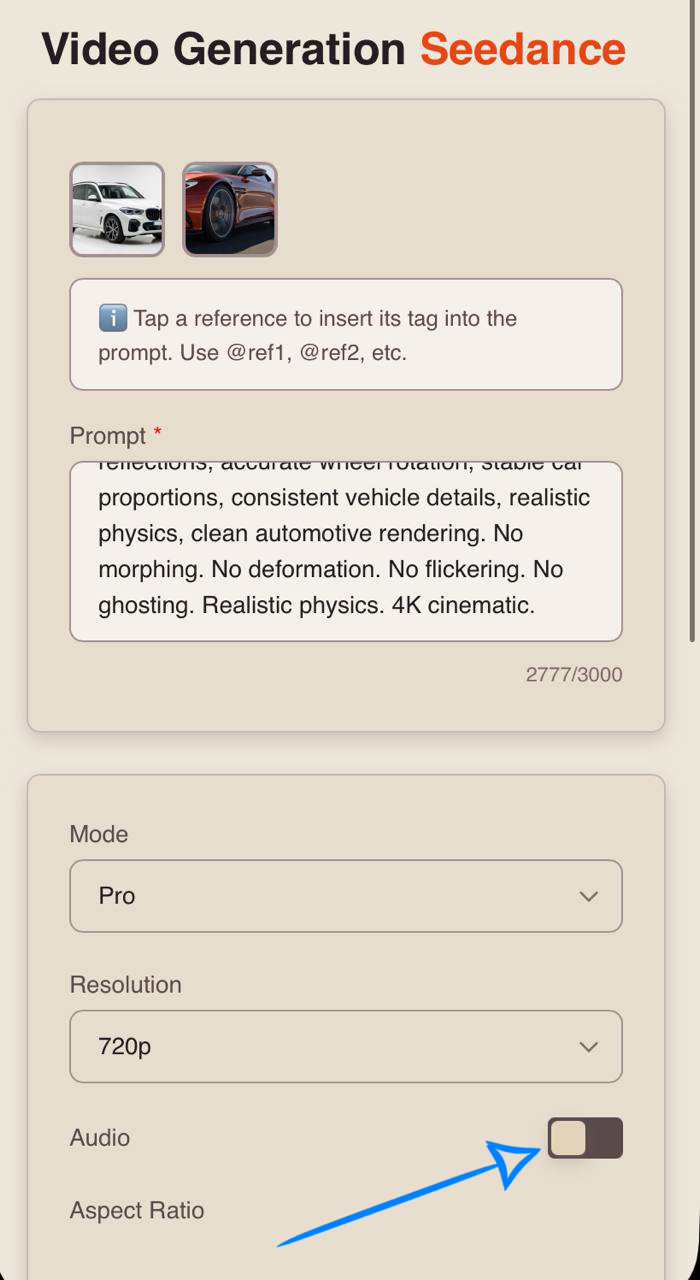
When using Seedance 2.0, you can generate videos with audio.
To add sound effects, enable the toggle - the neural network will automatically select and apply suitable audio.
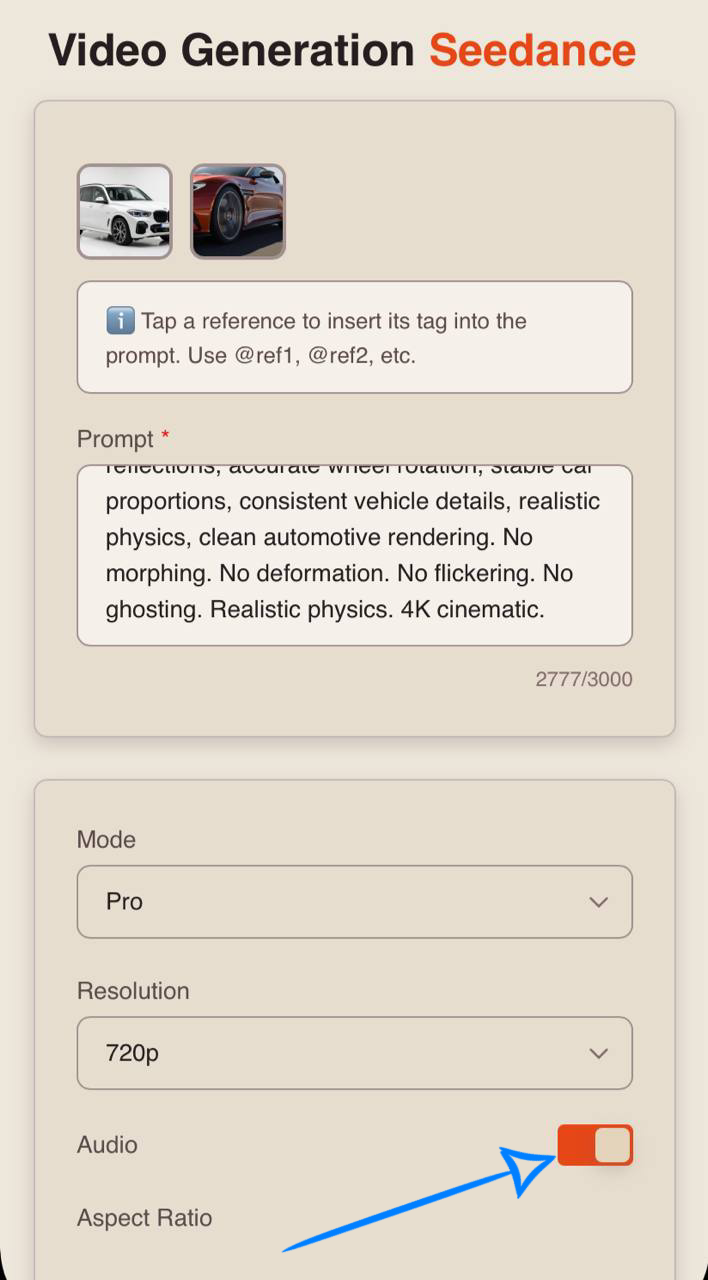
If you prefer generating video without sound, simply turn off the toggle.
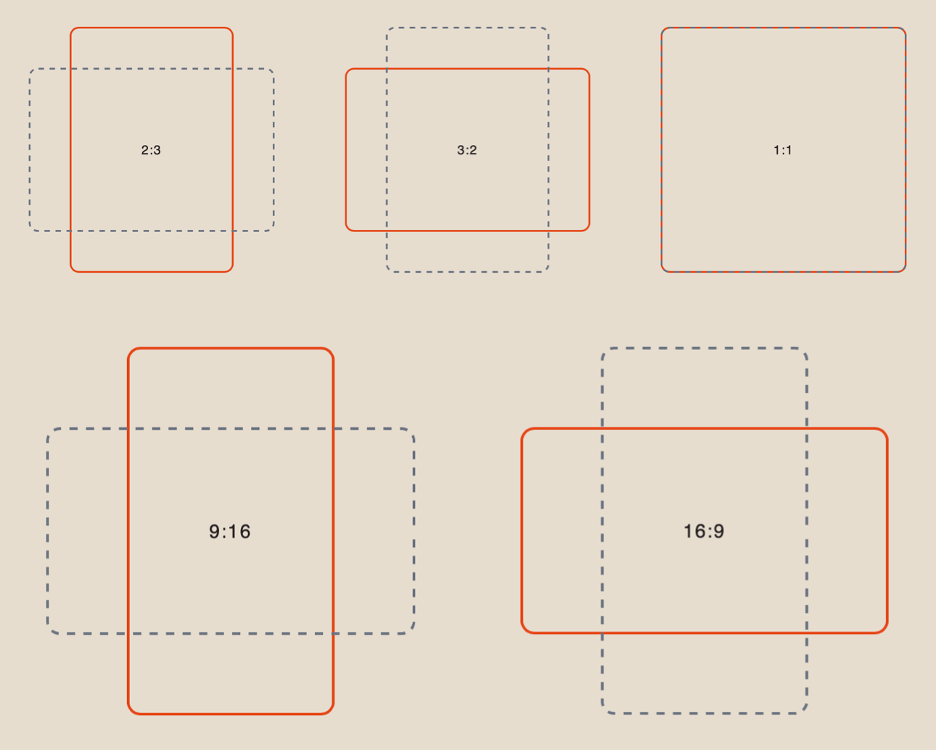
Aspect Ratio
When working with references, you have 6 aspect ratio options to choose from:
Duration
You can set the length of the generated video from 1 to 15 seconds.
❣️ Please note that the default duration in the settings is 4 seconds.
Result
«@ref1 — base video reference for exact track location, shot sequence, camera angles, camera movement, transitions, timing, framing, vehicle path, pacing, and full scene structure. Replicate every shot, camera angle, movement and transition from @ref1 exactly. Keep the exact same location, background, track layout, and camera behavior from @ref1.
@ref2 — strict vehicle identity reference for the replacement car. Use @ref2 as exact appearance reference for body shape, proportions, paint finish, headlights, grille, wheels, windows, mirrors, and surface details. Preserve exact vehicle likeness throughout. Stable vehicle design throughout.
Visual style and color palette: match @ref1 exactly, premium automotive commercial look, clean reflections, balanced contrast, natural daylight tones, detailed asphalt texture, polished highlights, subtle 35mm film grain.
Location and atmosphere: keep the exact same track location, asphalt surface, lane markings, safety barriers, curbs, background elements, lighting, weather conditions, and overall atmosphere from @ref1. Replace only the original car with the vehicle from @ref2.
Vehicle description: use the exact car from @ref2 with matching body silhouette, front fascia, side profile, rear design, wheel design, paint color, glass tint, trim details, and realistic proportions. Preserve exact vehicle likeness throughout. Stable vehicle design throughout.
Motion transfer: the replacement vehicle must follow the exact same driving path, speed pattern, wheel rotation timing, cornering behavior, body motion, and screen position as the original car in @ref1. Keep the exact same choreography, pacing, and shot timing.
[0:00-3s] Replicate the opening shot from @ref1 exactly. Same framing, same camera movement, same vehicle position, same motion timing, same location details. Replace only the original car with the vehicle from @ref2.
[3:00-7s] Replicate the middle shot from @ref1 exactly. Same camera angle, same tracking behavior, same motion, same timing, same transition. Keep the environment identical to @ref1 and keep the replacement vehicle consistent with @ref2.
[7:00-10s] Replicate the final shot from @ref1 exactly. Same framing, same camera motion, same vehicle movement, same ending position or transition. Preserve the exact track environment and replace only the car.
Technical requirements: shot-for-shot remake of @ref1 with vehicle replacement only. Keep exact location, exact camera motion, exact vehicle path, exact timing, and exact transitions from @ref1. Maintain realistic reflections, accurate wheel rotation, stable car proportions, consistent vehicle details, realistic physics, clean automotive rendering. No morphing. No deformation. No flickering. No ghosting. Realistic physics. 4K cinematic.»
💥 Step-by-Step Guide to Using Seedance New “Working with Audio References”
If you need to add your own voiceover or sound, you can do so using an audio reference.
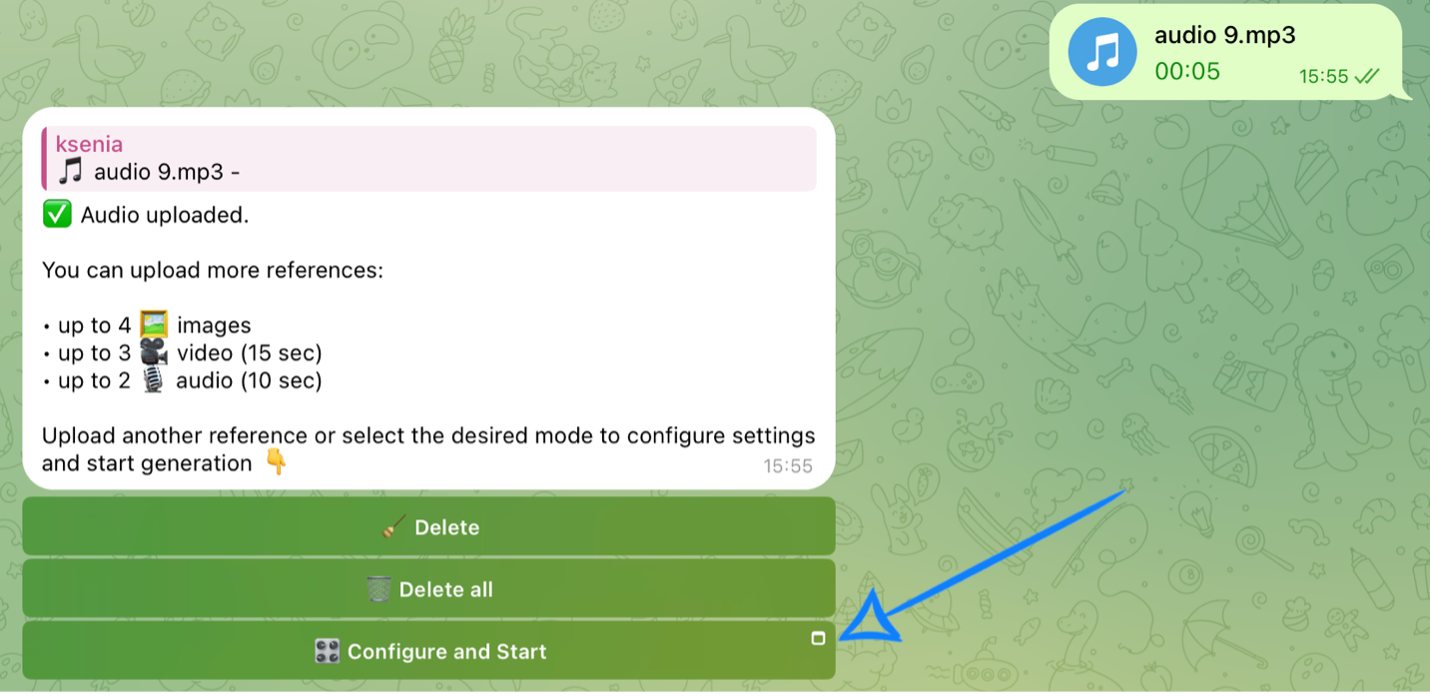
First, upload an image or video. Then, correctly upload your audio files.
Uploading Audio
Technical requirements for audio:
- File format: MP3
- Maximum number of uploaded audio files: up to 3
- Total duration of all audio files: up to 15 seconds
For example:
Model Settings
After uploading your references, click “Configure and Start” and then correctly set the parameters for the upcoming generation.
❣️ If you want to delete the uploaded references, click “Delete” or “Delete all.” After that, you will be able to submit a new request.
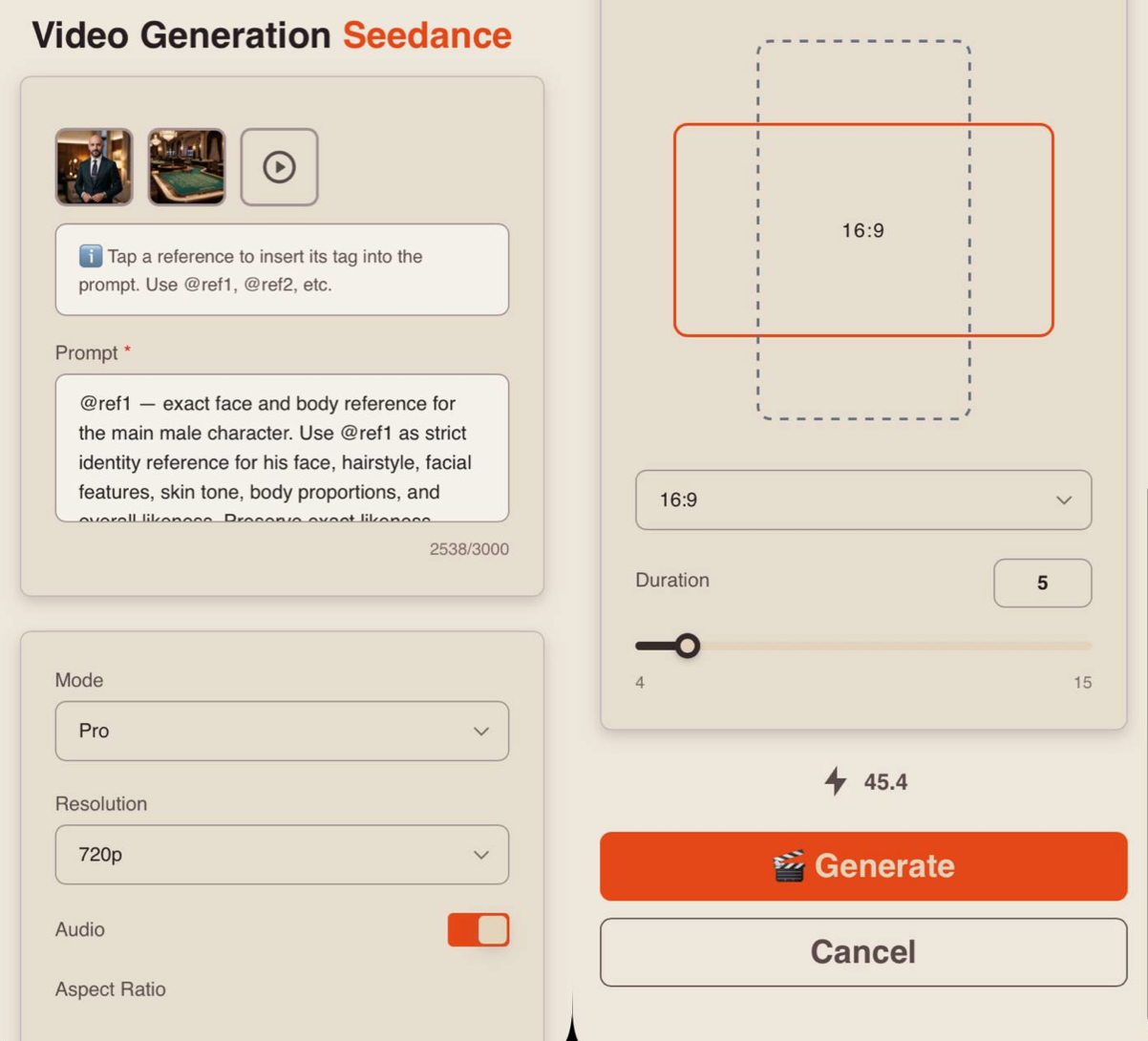
Prompt
High-quality generation directly depends on how accurately and consistently the scene is described. It’s important not just to present an idea, but to clearly define the character, environment, and behavior to avoid distortions and random changes during generation.
A well-structured text prompt should include:
- Character / Object Description
Describe the appearance of the character or object in as much detail as possible. Include key features such as face, body type, hairstyle, clothing, materials, shape, color, and other visual characteristics.
If the same character or object appears throughout the video, explicitly state this so the model preserves consistency. For example:
_“Same person in all shots. Preserve exact appearance throughout. Stable face throughout.”
- Action
Clearly describe what the character or object is doing, the sequence of actions, and how they interact with the environment. Use precise wording: instead of “walks beautifully,” write “walks forward confidently, turns their head toward the camera, adjusts the collar.” The more clearly defined the motion and its logic, the more stable and predictable the result.
- Location
Describe the setting in detail: interior or exterior, object placement, atmosphere, background, and key environmental elements.
- Lighting
Lighting defines the mood and depth of the scene. Specify the light source, its quality, and color: soft daylight, harsh backlight, warm volumetric lighting, neon accents, etc.
- Camera Movement
Indicate the shot type and camera movement, as they determine the video’s dynamics. You can combine techniques such as smooth tracking shots, sharp zoom-ins, or changing angles.
- Constraints and Stability
At the end of the prompt, define technical constraints to improve stability and visual quality. Typically, this includes avoiding distortions, flickering, deformations, or random changes in appearance or environment. For example:
“No deformation. No flickering. No ghosting. Stable face throughout. Realistic physics.”
Additional Recommendations
- Avoid vague wording (“beautiful,” “interesting,” “cool”) — it does not provide clear guidance to the model
- Break the scenario into time segments if needed (e.g., [0–3s], [3–6s]) for better control over timing and sequence
- When working with characters, fix their appearance and behavior to prevent random changes
- It is recommended to write prompts in English, as the model interprets phrasing more accurately and better understands details, styles, and camera movement — especially important for complex scenes
- The more detailed and precise the prompt, the higher the quality and predictability of the result
Tag System
A key feature when working with references in this tool is the tag system.
To add a tag to your prompt, click on the thumbnail of the desired image — the tag will be automatically inserted into the prompt field.
This allows the neural network to more accurately determine which reference should be used in a specific part of the prompt.
For example:
«@ref1— exact face and body reference for the main male character. Use @ref1 as strict identity reference for his face, hairstyle, facial features, skin tone, body proportions, and overall likeness. Preserve exact likeness throughout. No beautification. No deformation. Stable face throughout.
@ref2 — exact background and location reference. Use @ref2 as the strict environment reference for the setting, architecture, spatial layout, background details, lighting mood, and atmosphere.
@ref3 — voice and lip sync reference for the male character. The man on screen speaks the audio from @ref3 exactly. Voice and lip sync reference @ref3 exactly.
Visual style and color palette: realistic cinematic portrait, natural skin tones, color palette matchin @ref2, balanced contrast, soft realistic lighting, subtle 35mm film grain, polished 4K cinematic look.
Location and atmosphere: place the male character from @ref1 inside the exact environment from @ref2. Keep the same background composition, location details, lighting direction, atmosphere, and overall visual mood from @ref2.
Character description: one adult male based exactly on @ref1. Match his hairstyle, face shape, eyes, nose, jawline, skin tone, body proportions, and expression style exactly. Match his clothing from @ref1 with the same outfit design, colors, fabric, fit, and visible accessories. Preserve exact likeness throughout. No beautification. No deformation. Stable face throughout.
[0:00-3s] Medium shot, stabilized camera. The man stands naturally in the location from @ref2 and begins speaking directly to camera. Slow push in. Accurate facial performance and lip sync to @ref3.
[3:00-7s] Medium close-up, stabilized camera. Continue the speech with natural head movement, subtle blinking, realistic mouth articulation, and consistent expression. Keep the environment identical to @ref2 and the character fully consistent with @ref1.
[7:00-10s] Close-up, stabilized camera. The man finishes speaking while maintaining eye contact with the camera. Gentle cinematic push in, natural posture, stable identity, precise lip sync to@ref3. At the end of the video, he winks with one eye.
Technical requirements: one continuous speaking male character using @ref1 as strict identity reference and @ref2 as strict location reference. Accurate lip sync to @ref3. Natural facial motion, realistic blinking, realistic breathing, stable hands, stable clothing, stable face throughout. No morphing. No deformation. No flickering. No ghosting. Realistic physics. 4K cinematic.»
Mode
When working with references, you can choose between two modes:
Pro - a high-quality generation mode. It delivers more detailed visuals, realistic animation, and precise scene rendering, making it ideal for final videos.
Fast - a quick generation mode, ideal for testing and rapid iteration. It allows you to quickly experiment with ideas and scenarios but may be less detailed and precise. It also offers a more limited set of quality settings.
Resolution
When working with references, you have three resolution options:
- 480p.
Basic video resolution. Ideal for small mobile screens and saving data usage. The video may appear slightly blurry, and fine details will not be very sharp.
-
720p
Medium resolution. Provides a good balance between quality and file size. This format is widely used for online video, including platforms like YouTube, offering clear visuals suitable for most devices and mid-sized screens. -
1080p
High-quality video format with excellent detail and sharpness. Ideal for large screens and TVs. It requires more bandwidth and storage but provides maximum clarity and detail.
❣️ 1080p resolution is available only in Pro mode.
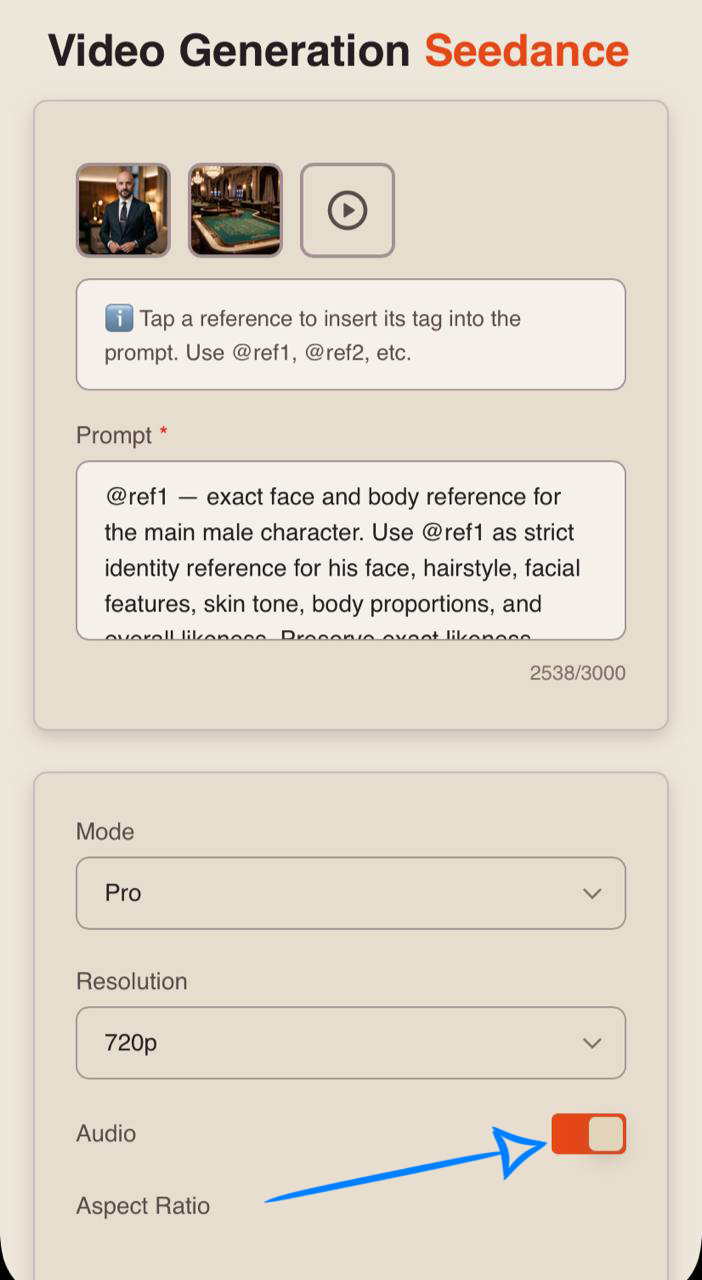
Audio
When using an audio reference, the toggle must be enabled.
If it is turned off, the generation will be performed without sound, even if an audio reference is provided.
Aspect Ratio
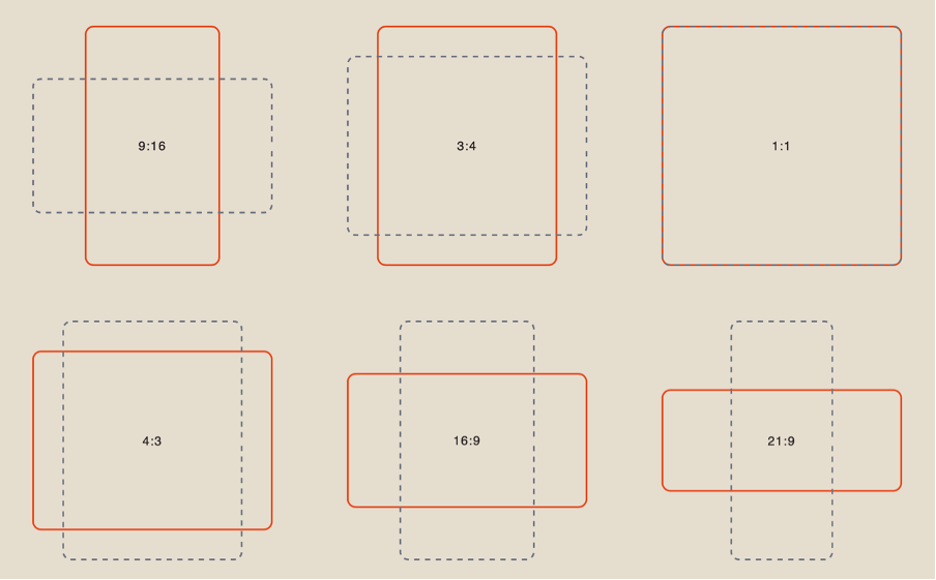
When working with references, you have 6 aspect ratio options to choose from:
Duration
You can set the length of the generated video from 1 to 15 seconds.
❣️ Please note that the default duration in the settings is 4 seconds.
Result
«@ref1 — exact face and body reference for the main male character. Use @ref1 as strict identity reference for his face, hairstyle, facial features, skin tone, body proportions, and overall likeness. Preserve exact likeness throughout. No beautification. No deformation. Stable face throughout.
@ref2 — exact background and location reference. Use @ref2 as the strict environment reference for the setting, architecture, spatial layout, background details, lighting mood, and atmosphere.
@ref3 — voice and lip sync reference for the male character. The man on screen speaks the audio from @ref3 exactly. Voice and lip sync reference @ref3 exactly.
Visual style and color palette: realistic cinematic portrait, natural skin tones, color palette matching @ref2, balanced contrast, soft realistic lighting, subtle 35mm film grain, polished 4K cinematic look.
Location and atmosphere: place the male character from @ref1 inside the exact environment from @ref2. Keep the same background composition, location details, lighting direction, atmosphere, and overall visual mood from @ref2.
Character description: one adult male based exactly on @ref1. Match his hairstyle, face shape, eyes, nose, jawline, skin tone, body proportions, and expression style exactly. Match his clothing from @ref1 with the same outfit design, colors, fabric, fit, and visible accessories. Preserve exact likeness throughout. No beautification. No deformation. Stable face throughout.
[0:00-3s] Medium shot, stabilized camera. The man stands naturally in the location from @ref2 and begins speaking directly to camera. Slow push in. Accurate facial performance and lip sync to @ref3.
[3:00-7s] Medium close-up, stabilized camera. Continue the speech with natural head movement, subtle blinking, realistic mouth articulation, and consistent expression. Keep the environment identical to @ref2 and the character fully consistent with @ref1.
[7:00-10s] Close-up, stabilized camera. The man finishes speaking while maintaining eye contact with the camera. Gentle cinematic push in, natural posture, stable identity, precise lip sync to @ref3. At the end of the video, he winks with one eye.
Technical requirements: one continuous speaking male character using @ref1 as strict identity reference and @ref2 as strict location reference. Accurate lip sync to @ref3. Natural facial motion, realistic blinking, realistic breathing, stable hands, stable clothing, stable face throughout. No morphing. No deformation. No flickering. No ghosting. Realistic physics. 4K cinematic.»
We hope this guide helps you better understand the capabilities of Seedance 2.0 and use the tool with confidence in your work. We’ve aimed to make it as clear and simple as possible so you can quickly start practicing. If you encounter difficulties along the way — that’s completely normal.
Experiment, try different approaches, and gradually find what works best for you. Over time, you’ll gain more precise control over the results and be able to create exactly the visuals you envision. 💛
SYNTX AI: Syntx AI
SYNTX Support: Syntx Support
YouTube channel “SYNTX”: Syntx YouTube
SYNTX.AI Academy: SYNTX Academy